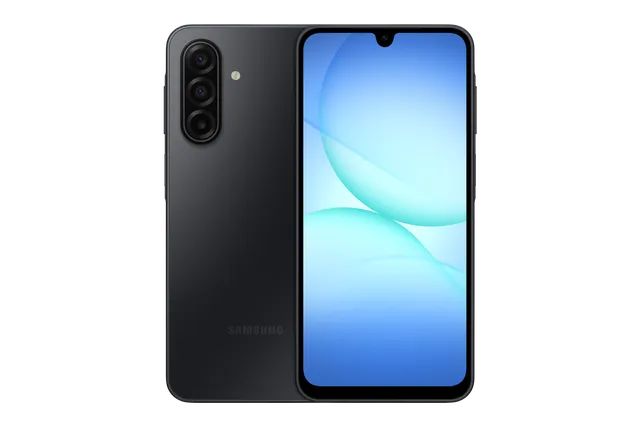
Black
Phone · Samsung Galaxy A17 5G
Stock firmware and official updates for the Samsung Galaxy A17 5G (SM-A176W), by region.
 Canada BMCBuildA176WVLU8CZJ5AndroidAndroid 17Security patchOct 2026ReleasedOct 27, 2026DetailsWhat's newCanada BWABuildA176WVLU8CZJ5AndroidAndroid 17Security patchOct 2026ReleasedOct 27, 2026DetailsWhat's new
Samsung's official release notes, newest first.
One UI 9 Productivity and multitasking More customizable quick panel You can now rearrange and customize the controls in your quick panel even more than before. You can change the size of the brightness and volume sliders as well as the media player. You can also separate the sound mode button from the volume slider. Privacy, security, and device protection Warranty and care The new Warranty and care menu in settings lets you check your warranty information and access diagnostic checks and useful information for keeping your Galaxy in top condition. Lock down your phone quickly It's now easier to securely lock your phone in a hurry. Just press and hold the Volume down and Side buttons at the same time or tap the Power button in the quick panel. This prevents biometrics from being used the next time you unlock your phone. Location access transparency Stay on top of your location privacy. A blue indicator will appear at the top of the screen when an app accesses your location. Tap the indicator in the quick panel to see which app it is. Samsung Health New look for Samsung Health Samsung Health has been redesigned to make your health data easier to understand. Enjoy clearer visuals, improved charts, and a more engaging experience to help you reach your health goals. Customize your Health home screen Resize cards and organize them by category, like Activity, Sleep, Mindfulness, and Nutrition, so your top priorities are easy to access. Log health data quickly It's now easier to add your health information right from the Samsung Health home screen. You can log your mood, meals, and more. You can even use the camera for faster input. Advanced trend analysis Track your progress with improved trend charts in Samsung Health. View data in hourly, daily, or weekly intervals, pinch to zoom in for a closer look, and overlay multiple charts to compare your performance across different periods. Monitor changes in your sleep vitals Samsung Health helps you notice meaningful changes in your sleep health data. Use Galaxy Watch or Ring measurements to better understand your daily health patterns. Manage your heart health Track key health metrics and lifestyle factors that affect your heart. A daily score based on your sleep, exercise, BMI, and blood pressure helps you better understand your current heart health trends. Track your cardio load See how your workouts and activity impact your heart so you'll know when to push harder and when to rest. Your target cardio load range adjusts daily based on your recent activity and training focus. Check your fitness index Your Fitness Index is an overall score calculated using five key fitness metrics: body composition, cardio, strength, flexibility, and endurance. Set a goal and unlock personalized insights tailored to your results. Keep your ears safe The new Hearing tracker monitors sound levels detected by your Galaxy Watch and headphone audio levels to help you manage your exposure to loud sounds. View your cycle and body rhythm Get a more personalized view of your cycle and body rhythm with new cycle tracking options. You can view your cycle information in your calendar and better understand your health patterns. Accessibility Discover new Accessibility features Check the What's new menu in Accessibility settings to learn about and try the latest Accessibility features for your Galaxy. Text spotlight for easier reading Need a closer look? Tap any text on the screen to show it enlarged and highlighted in its own window. You can also customize the font size, colors, and other settings to match your preferences. Physical keyboard shortcuts Use shortcuts on your physical keyboard to access the Accessibility settings you need without touching the screen. Mouse keys enhancements New options are available when using your keyboard for mouse interactions including speed and acceleration control. You can also use the keyboard's number pad to point and click. Replace swipe with single tap The Replace swipe with single tap option is now located in the Dexterity and interaction menu instead of the Assistant menu for easier access. Select to speak Get quick audio readouts without turning on full TalkBack. With the new Select to speak feature, you can select an item on your screen, like text or an image, and hear it read or described out loud. Improved TalkBack updates TalkBack updates can now be applied with a simple app update from the Play Store, helping you get the latest accessibility features and enhancements.
Canada CHRCanada ESKBuildA176WVLU8CZJ5AndroidAndroid 17Security patchOct 2026ReleasedOct 27, 2026DetailsWhat's newCanada FIZBuildA176WVLU8CZJ5AndroidAndroid 17Security patchOct 2026ReleasedOct 27, 2026DetailsWhat's newCanada FMCBuildA176WVLU8CZJ5AndroidAndroid 17Security patchOct 2026ReleasedOct 27, 2026DetailsWhat's newCanada GLWBuildA176WVLU8CZJ5AndroidAndroid 17Security patchOct 2026ReleasedOct 27, 2026DetailsWhat's newCanada KDOBuildA176WVLU8CZJ5AndroidAndroid 17Security patchOct 2026ReleasedOct 27, 2026DetailsWhat's newCanada PCMBuildA176WVLU8CZJ5AndroidAndroid 17Security patchOct 2026ReleasedOct 27, 2026DetailsWhat's newCanada PMBBuildA176WVLU8CZJ5AndroidAndroid 17Security patchOct 2026ReleasedOct 27, 2026DetailsWhat's newCanada RWCBuildA176WVLU8CZJ5AndroidAndroid 17Security patchOct 2026ReleasedOct 27, 2026DetailsWhat's newCanada SOLBuildA176WVLU8CZJ5AndroidAndroid 17Security patchOct 2026ReleasedOct 27, 2026DetailsWhat's newCanada TBTBuildA176WVLU8CZJ5AndroidAndroid 17Security patchOct 2026ReleasedOct 27, 2026DetailsWhat's newCanada TLSBuildA176WVLU8CZJ5AndroidAndroid 17Security patchOct 2026ReleasedOct 27, 2026DetailsWhat's newCanada VMCBuildA176WVLU8CZJ5AndroidAndroid 17Security patchOct 2026ReleasedOct 27, 2026DetailsWhat's newCanada VTRBuildA176WVLU8CZJ5AndroidAndroid 17Security patchOct 2026ReleasedOct 27, 2026DetailsWhat's newCanada XACBuildA176WVLU8CZJ5AndroidAndroid 17Security patchOct 2026ReleasedOct 27, 2026DetailsWhat's newReleased for 17 CSCs: BMC, BWA, CHR, ESK, FIZ, FMC, GLW, KDO, PCM, PMB, RWC, SOL, TBT, TLS, VMC, VTR, XAC
• Security The device is protected with improved security. These changes may vary depending on the model, country, or network operator of the customer environment.
Released for 17 CSCs: BMC, BWA, CHR, ESK, FIZ, FMC, GLW, KDO, PCM, PMB, RWC, SOL, TBT, TLS, VMC, VTR, XAC
Source: Samsung• Security The device is protected with improved security. These changes may vary depending on the model, country, or network operator of the customer environment.
Released for 17 CSCs: BMC, BWA, CHR, ESK, FIZ, FMC, GLW, KDO, PCM, PMB, RWC, SOL, TBT, TLS, VMC, VTR, XAC
Source: SamsungOne UI 8.5 Visual design Fresh new look One UI seamlessly integrates into your daily routine by combining immersive visuals with meaningful personalization for a more refined and sophisticated design. Transparent blur effects add depth and make content easier to navigate, while floating elements react organically to your workflow for a more focused experience. Through familiar and intuitive data visualization, One UI delivers a design that feels both personal and relatable, helping you focus on what matters. Camera New filters Three new filters are available to add vibrant film-like effects to your pictures. Home and Lock screens New downloadable wallpapers Discover new wallpapers featuring interactive elements. Wallpapers are downloadable so they don’t use up your storage space when not in use. More customizable clock fonts Personalize your Lock screen clock. You can now adjust the thickness of more font styles to match your preferred look. Weather Enhanced weather widget Quickly check upcoming precipitation in the Weather widget on your Home screen. The widget now shows a graph if precipitation is expected in the next few hours. Pollen index Check how much pollen is in the air to help manage your allergies. You can check pollen levels for trees, grass, and ragweed. Communication Direct voicemail Can't answer right now? Let callers record a voice message directly on your phone that you can listen to later. Clock Weather alarm backgrounds Wake up to an alarm that gets you ready for the day’s weather. Your alarm screen can now show the current weather conditions as a background when it rings. Time zone converter Compare time zones at a glance. The new slider in the Clock app makes it easy to check the time difference between places around the world. Connectivity Auto Hotspot Share your phone's internet connection more easily. You can now share your hotspot with your Samsung account family group, or create your own hotspot sharing group with anyone you choose. Family device sharing Easily connect and share files, screens and more with your family. Family device sharing lets you use features like Quick Share, Auto Hotspot, and Multi control with Galaxy devices that belong to your family members. Quickly connect to Smart View devices Connect to your favorite display faster. You can now add a shortcut on your Home screen to instantly mirror your phone’s screen to a TV or other display device. Quick Share Avoid unwanted sharing requests You can now set Quick Share to only receive files from other devices signed in to your Samsung account or Google account. Samsung Health Enhanced weekly reports See a fuller picture of your health each week. Weekly reports now include data from your medication tracker and mindfulness sessions. Upgraded sharing experience Share your workouts your way. Mix and match your exercise stats with photos from your workout to create the perfect social media post. Start meditations from your watch Find calm right from your wrist. You can now start favorite or recommended meditations directly on your Galaxy Watch without picking up your phone. Antioxidant measurements from your watch Check your antioxidant levels anytime. Measure directly from your Galaxy Watch, even if it’s not connected to your phone. Works with Galaxy Watch8 and Galaxy Watch Ultra. Battery and power Revamped battery info See your battery use more clearly. The redesigned Battery settings screen makes it easier to check remaining time, charging status, and daily usage over the past week. Improved Power saving Use Power saving to make your battery last longer without charging. Choose Standard for moderate savings and customizable limits, or choose Maximum to turn off all non-essential features and make your battery last as long as possible. Security and privacy Theft protection Keep your phone and data safe in case it is lost or stolen. Turn on Failed authentication lock to automatically lock the screen in case there are too many failed attempts to verify your identity using your fingerprints, PIN, pattern, or password. Identity check also protects even more settings than before. Turn off Auto blocker temporarily If you need to temporarily disable Auto blocker's security protection, a new option lets you turn it on automatically 30 minutes later so you don't forget. Check the security status of your devices Keep all your devices protected. Knox Matrix now shows when any of the supported devices signed in to your Samsung account need a software update for the latest security protections. Accessibility Control magnification with mouse or keyboard Keep what you need magnified in view with these new options. You can make the magnified area follow the cursor as you type or move when you change focus using the keyboard. When using a mouse, you can make the magnified area shift as you move the pointer to the edge of the screen. Dwell action and Corner actions The Auto action after pointer stops feature has been divided into 2 features. Dwell action lets you set custom actions when your mouse stops moving for a certain amount of time. Corner actions let you set a different action for each corner of the screen. Even more improvements More customizable quick panel Arrange your quick settings just the way you like them. You can now add, remove, reorder, and reorganize controls in the quick panel. Early alerts for reminders Get alerts before reminders are due to make sure you don’t forget important tasks. You can choose how far in advance to get an alert for each reminder. Insert tables in Samsung Notes Organize information in your notes with tables. You can adjust column widths, colors, and border designs while the auto calculation feature helps you stay productive and save time. Redesigned New tab page The page that appears when you open a new tab in Samsung Browser has been redesigned to help you quickly access the websites and features you need the most. The New tab page now shows the current security status as well as open tabs from Samsung Browser on other devices. Calculator nudges Save time on calculations. Numbers and formulas copied to your clipboard will be suggested when you open Calculator so you can enter them with a quick tap.
Released for 17 CSCs: BMC, BWA, CHR, ESK, FIZ, FMC, GLW, KDO, PCM, PMB, RWC, SOL, TBT, TLS, VMC, VTR, XAC
Source: Samsung• Security The device is protected with improved security. These changes may vary depending on the model, country, or network operator of the customer environment.
Released for 17 CSCs: BMC, BWA, CHR, ESK, FIZ, FMC, GLW, KDO, PCM, PMB, RWC, SOL, TBT, TLS, VMC, VTR, XAC
Source: Samsung• Security The device is protected with improved security. These changes may vary depending on the model, country, or network operator of the customer environment.
Released for 17 CSCs: BMC, BWA, CHR, ESK, FIZ, FMC, GLW, KDO, PCM, PMB, RWC, SOL, TBT, TLS, VMC, VTR, XAC
Source: Samsung• Security The device is protected with improved security. These changes may vary depending on the model, country, or network operator of the customer environment.
Released for 17 CSCs: BMC, BWA, CHR, ESK, FIZ, FMC, GLW, KDO, PCM, PMB, RWC, SOL, TBT, TLS, VMC, VTR, XAC
Source: Samsung
