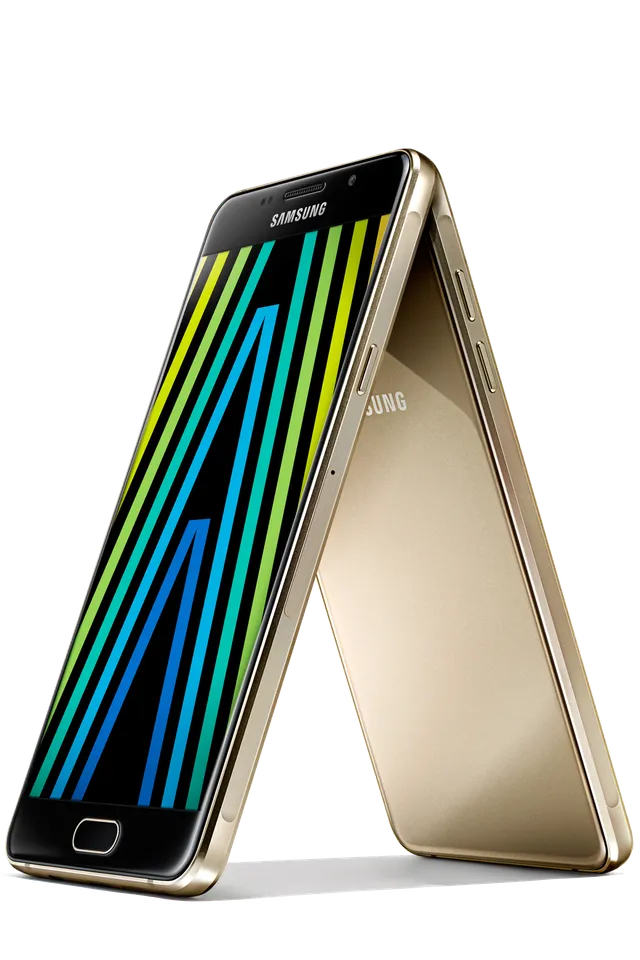
GOLD
Phone · Samsung Galaxy A5 (2016)
Stock firmware and official updates for the Samsung Galaxy A5 (2016) (SM-A5100), by region.
 China CHCBuildA5100ZCS2CTH1AndroidAndroid 7Security patchAug 2019ReleasedNov 18, 2020DetailsWhat's new
 Hong Kong SAR China TGYBuildA5100ZHS2CTH1AndroidAndroid 7Security patchAug 2019ReleasedNov 18, 2020DetailsWhat's new
Samsung's official release notes, newest first.
- The latest Android security patch has been applied. ㆍDevice security has been further enhanced.
Released for 1 CSC: TGY
Source: Samsung- The latest Android security patch has been applied. ㆍDevice security has been further enhanced.
Released for 1 CSC: CHC
Source: Samsung- The latest Android security patch has been applied. ㆍDevice security has been further enhanced.
Released for 1 CSC: CHC
Source: Samsung- The latest Android security patch has been applied. ㆍDevice security has been further enhanced.
Released for 1 CSC: TGY
Source: Samsung- The latest Android security patch has been applied. ㆍDevice security has been further enhanced. - Calendar subscribed function will be deleted.
Released for 1 CSC: CHC
Source: Samsung- The latest Android security patch has been applied. ㆍDevice security has been further enhanced.
Released for 1 CSC: TGY
Source: Samsung- The latest Android security patch has been applied. ㆍDevice security has been further enhanced.
Released for 1 CSC: TGY
Source: Samsung- The latest Android security patch has been applied. ㆍDevice security has been further enhanced.
Released for 1 CSC: CHC
Source: Samsung- OS upgrade - Android 7.1 Nougat - Provides new UX - Improved usability of the Notification feature and Quick settings button - Multi window is supported - Improved setting menu - Efficient space for installation of downloaded apps, improved speed of system upgrade and app installation - Added new feature · Samsung Cloud V3 is supported in this update,upto 15GB cloud space can be used to backup or sync user data,photos,videos and applications. · After upgrading, OneDrive App will be removed. You can download the OneDrive App from Galaxy Apps. · After upgrading, the SmartManager app icon will be deleted and that function can be available in Setting - Device maintenance. · After upgrading, some widgets will be deleted: (Smart Manager, Smart Manager, Picture frame) · Please set your city settings on the weather widget after upgrading, too. · The user settings for Easy mode may be removed on the new OS. You may need to set them again after the OS upgrade. ※ Some apps that haven't been optimised for Android Nougat might not work properly after the upgrade. In this case, upgrade the app to the latest version via Galaxy Apps. ※ The functionality of some features may differ after the upgrade. Some apps may not function normally. ※ After upgrading, please set your keyboard settings, downloaded language and E-Mail account again. ※ Errors during the upgrade may cause data loss. Back up any important data before upgrading.
Released for 1 CSC: TGY
Source: Samsung- OS upgrade - Android 7.1 Nougat - Provides new UX - Improved usability of the Notification feature and Quick settings button - Multi window is supported - Improved setting menu - Efficient space for installation of downloaded apps, improved speed of system upgrade and app installation - Added new feature · Samsung Cloud V3 is supported in this update,upto 15GB cloud space can be used to backup or sync user data,photos,videos and applications. · After upgrade to N OS, Samsung Cloud delete the app icon and change the path by Settings→Cloud and accounts→Samsung Cloud · After upgrading, you will need to set Quick Clean widget, Pictur Frame widget, Samsung Music widget and Email widget again. (Pictur Frame is downloadable from Galaxy Apps.) · Please set your city settings on the weather widget after upgrading, too. · Before upgrading, please update Samsung Health to the latest version, otherwise some data may be lost after the upgrade. · After upgrade to N OS, the Phone, Contacts, Calendar, Messages's app locks will be off, and can be turned on in the Smart Manager. · The user settings for Easy mode may be removed on the new OS. You may need to set them again after the OS upgrade. · The Baidu search widget is replaced by the Baidu app. ※ Some apps that haven't been optimised for Android Nougat might not work properly after the upgrade. In this case, upgrade the app to the latest version via Galaxy Apps. ※ The functionality of some features may differ after the upgrade. Some apps may not function normally. ※ After upgrading, please set your keyboard settings, downloaded language and E-Mail account again. ※ Errors during the upgrade may cause data loss. Back up any important data before upgrading.
Released for 1 CSC: CHC
Source: Samsung- Improved performance ㆍWeather widget stability improved. - The latest Android security patch has been applied. ㆍDevice security has been further enhanced.
Released for 1 CSC: TGY
Source: Samsung- Improved performance • Weather widget stability improved. - The latest Android security patch has been applied. • Device security has been further enhanced.
Released for 1 CSC: CHC
Source: Samsung- The latest Android security patch has been applied. ㆍDevice security has been further enhanced.
Released for 1 CSC: TGY
Source: Samsung- Changed from "China Telecom(Macau)" to "China Telecom". - Other bug fixes ㆍFixed an issue that a contact with extension number can't be displayed when dail out. - The latest Android security patch has been applied. ㆍDevice security has been further enhanced.
Released for 1 CSC: CHC
Source: Samsung- The latest Android security patch has been applied. ㆍDevice security has been further enhanced.
Released for 1 CSC: TGY
Source: Samsung- The latest Android security patch has been applied. ㆍDevice security has been further enhanced.
Released for 1 CSC: CHC
Source: Samsung- The latest Android security patch has been applied. ㆍDevice security has been further enhanced.
Released for 1 CSC: TGY
Source: Samsung- The latest Android security patch has been applied. ㆍDevice security has been further enhanced.
Released for 1 CSC: CHC
Source: Samsung- The latest Android security patch has been applied. ㆍDevice security has been further enhanced.
Released for 1 CSC: TGY
Source: Samsung- Improved performance ㆍThe stability of the Bluetooth is improved. - The latest Android security patch has been applied. ㆍDevice security has been further enhanced.
Released for 1 CSC: CHC
Source: Samsung- Other bug fixes ㆍWhen checking the mail with the Knox Container app, the problem that the mail body disappears is solved. - The latest Android security patch has been applied. ㆍDevice security has been further enhanced.
Released for 1 CSC: TGY
Source: Samsung- The latest Android security patch has been applied. ㆍDevice security has been further enhanced.
Released for 1 CSC: CHC
Source: SamsungㆍOS upgrade - Android 6.0 Marshmallow ※ Security Enhancements ※ Some apps may be incompatible after OS upgraded. please update the apps to the latest version via Galaxy Apps and Play store. ※ After uploda to Android OS 6.0, following app will be installed:Smart Tutor and Facebook ※ After upgrade, Google Settings is not supported again, which will be removed.
Released for 1 CSC: TGY
Source: Samsung- The latest Android security patch has been applied. ㆍDevice security has been further enhanced.
Released for 1 CSC: CHC
Source: Samsung· OS upgrade - Android 6.0 Marshmallow · The new TouchWiz provides enhanced usability and an updated visual design. · Quick connect helps you easily find and connect to nearby devices by showing currently connected devices and previous connections. · Fingerprints are securely protected. An alternative unlock method (pattern, PIN, or password) is required to add fingerprints. · A new vibration pattern concept has been applied. ※ Before OS 6.0 upgrading, please be sure to update the Samsung Gear to the latest version. ※ Android 6.0 Marshmallow does not support the Decrypt device function. If your mobile device is encrypted, encryption cannot be disabled after upgrading. If you want encryption to be disabled after upgrading, it must be disabled before you upgrade your device. To disable encryption go to Settings - Security, then select Decrypt device. ※ Some apps that were installed via the Lollipop OS may need to be updated after upgrading to the Marshmallow OS. Go to Galaxy Apps to update apps. ※ Email , Smart manager widget may disappear on home screen after OS upgraded, please set these widgets or relative application again if you used. ※ Rename Smart Manager Widget to Quick Clean. Remain CLEAN ALL item of the original nine items.You can clean storage and ram directly after clicking it. ※ The Smart stay menu has been removed from the quick panel. (It can still be accessed via Settings.) ※ bubbles function may disappear in messages settings. ※ The temperature of the device may temporarily increase during the software upgrade or update because of the data download and associated behaviours.
Released for 1 CSC: CHC
Source: Samsung- The latest Android security patch has been applied. ㆍDevice security has been further enhanced.
Released for 1 CSC: TGY
Source: Samsung- Improved performance ㆍThe Stability of Samsung Pay Function has been improved - The latest Android security patch has been applied. ㆍDevice security has been further enhanced.
Released for 1 CSC: CHC
Source: SamsungㆍDevice stability improvements, bug fixes. ㆍNew and / or enhanced features. ㆍFurther improvements to performance.
Released for 1 CSC: CHC
Source: Samsung- The latest Android security patch has been applied. ㆍDevice security has been further enhanced.
Released for 1 CSC: TGY
Source: SamsungㆍDevice stability improvements, bug fixes. ㆍNew and / or enhanced features. ㆍFurther improvements to performance.
Released for 1 CSC: CHC
Source: Samsung- The latest Android security patch has been applied. ㆍDevice security has been further enhanced.
Released for 1 CSC: TGY
Source: Samsung- Other bug fixes ㆍFixed the issue that the device couldn't be used when was closed screen occasionally - The latest Android security patch has been applied. ㆍDevice security has been further enhanced.
Released for 1 CSC: TGY
Source: Samsung- The latest Android security patch has been applied. ㆍDevice security has been further enhanced.
Released for 1 CSC: CHC
Source: Samsung- The latest Android security patch has been applied. ㆍDevice security has been further enhanced.
Released for 1 CSC: TGY
Source: Samsung- Other bug fixes ㆍFixed the issue that the device couldn't be used when was closed screen occasionally - The latest Android security patch has been applied. ㆍDevice security has been further enhanced.
Released for 1 CSC: CHC
Source: Samsung- The latest Android security patch has been applied. ㆍDevice security has been further enhanced.
Released for 1 CSC: TGY
Source: Samsung- Improved performance ㆍThe Stability of Samsung Pay Function has been improved ㆍThe device performance has enhanced with efficient system management. - The latest Android security patch has been applied. ㆍDevice security has been further enhanced.
Released for 1 CSC: CHC
Source: Samsungㆍadded the icon about the SamsungPay ㆍImproved performance with efficient memory management ㆍapply the new vibration mode ㆍApply the Andriod regular security patch.
Released for 1 CSC: CHC
Source: Samsung- Improved performance with efficient memory management - Fixed not fully charging battery problem at low temperature - Fixed not fast charging problem during power off - Apply the Andriod regular security patch.
Released for 1 CSC: TGY
Source: SamsungㆍImproved performance with efficient memory management ㆍFixed not fully charging battery problem at low temperature ㆍFixed not fast charging problem during power off ㆍApply the Andriod regular security patch.
Released for 1 CSC: CHC
Source: SamsungㆍDevice stability improvements, bug fixes. ㆍNew and / or enhanced features. ㆍFurther improvements to performance.
Released for 1 CSC: TGY
Source: SamsungㆍAdded the "Galaxy Care" that provied the optimization, searching the new infomation, question and answer etc. for customer ㆍAdd QR Code feature for Camera. ㆍApply the Andriod regular security patch.
Released for 1 CSC: CHC
Source: Samsung- The stability of Music app has been improved. - The security of your device has been improved.
Released for 1 CSC: TGY
Source: SamsungㆍUpdate PaperFun Theme ㆍUpdate SmartManager Application ㆍUpdate Message Application
Released for 1 CSC: CHC
Source: SamsungㆍIncreased the stability of system ㆍIncreased the stability of camera
Released for 1 CSC: CHC
Source: Samsung
