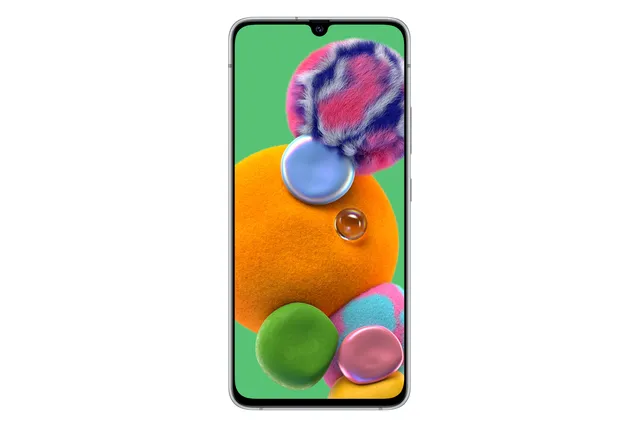
Phone · Samsung Galaxy A90 5G
Stock firmware and official updates for the Samsung Galaxy A90 5G (SM-A9080), by region.
Samsung's official release notes, newest first.
• The latest Android security patch has been applied. - Device security has been further enhanced.
Released for 1 CSC: CHC
Source: Samsung• Network - New network operator(CBN) is supported. • The latest Android security patch has been applied. - Device security has been further enhanced.
Released for 1 CSC: CHC
Source: Samsung- The latest Android security patch has been applied. ㆍDevice security has been further enhanced.
Released for 1 CSC: CHC
Source: Samsung• The latest Android security patch has been applied. - Device security has been further enhanced.
Released for 1 CSC: CHC
Source: SamsungTaken from the SM-A908B; this model can differ (chipset, network bands).
• New carlink service : Baidu CarLife + Samsung version, can connect the mobile phone and car display, facilitate you to use the phone on the big screen, including navigation, listening music, calls, etc., for your travel convenience . • New Application : JD IOT (京东小家) IoT App to connected to home appliances, etc. • Following applications or features added: Call & text on other devices - If the tablet and phone uses the same WLAN network, you can send or receive a call or a text message on the tablet. Don't miss important calls and messages while enjoying your tablet. ※ In order to use “Call & text on other devices” feature, both the tablet and phone must support this feature. • Overall stability of your device has been improved. • The latest Android security patch has been applied. - Device security has been further enhanced.
Released for 1 CSC: CHC
Source: SamsungOne UI 4.1 Update One UI 4.1 brings you the latest features for your Galaxy devices. More intuitive, more fun, more secure, and easier than ever. Check out the changes below. Gallery Do more with your memories. Gallery brings enhanced features for remastering and organizing your pictures and videos, and sharing is now easier than ever. More suggestions Get help creating artistic portraits and exciting highlight reels. Gallery will suggest the best effects for your pictures. Add portrait effects You can now add background blur to any picture with a person in view. Portrait relighting Adjust the lighting for portraits, even after you've taken them, to make sure you always get the perfect shot. Share albums as links No need to invite people to shared albums individually anymore. Just create a link that can be shared with anyone, even if they don't have a Samsung account or Galaxy device. All your invitations together Easily accept invitations to shared albums, even if you miss the notifications. Invitations that you haven't responded to yet will appear at the top of your shared album list. Create time lapse videos Turn a picture into a vivid 24-hour time-lapse video. A button will appear for pictures of scenery including the sky, bodies of water, mountains, or cities. Your video will appear as if an entire day has passed. AR Zone Express yourself like never before in augmented reality. Create your own emojis, stickers, doodles, and more. Background colors in mask mode Keep the focus on your AR emoji while wearing it as a mask. Choose from a variety of colors to use as your background. Samsung Health Get deeper insights into your health and enhanced exercise tracking in the latest version of Samsung Health. Get insights about your body composition Set targets for your weight, body fat percentage, and skeletal muscle mass. You'll get tips for reaching your goals. Build better sleep habits Track your sleep and get coaching based on your sleep patterns. Enhanced exercise tracking On your Galaxy Watch4, you can set interval training targets before you start running or cycling. You'll get a report on your phone when you're finished. Your watch can also give information about sweat loss when you run and heart rate recovery for aerobic workouts. Smart Switch Transfer contacts, photos, messages, and settings from an old phone or tablet to your new Galaxy. One UI 4.1 lets you transfer more than ever. More transfer options You’ll get 3 options when transferring content to your new Galaxy. You can choose to transfer everything, transfer just your accounts, contacts, calls, and messages, or go Custom to choose exactly what you want to transfer. Sharing One UI 4.1 gives you even more ways to share with others. Share your WLAN network Use S Share to share your current WLAN network with someone else. The person you share with will be able to connect automatically without entering the password. Include editing history when you share pictures and videos When you share pictures and videos with S Share, you can include the complete editing history so the receiver can see what's changed or revert back to the original. Share tips with others Find something useful in the Tips app? Tap the Share icon to send it to a friend. More features and improvements Color palette Customize your phone with unique colors based on your wallpaper. Your custom color palette now appears in more apps. Add emojis to your calendar In addition to stickers, you can now add emojis to a date on your calendar to express your feelings. New actions for Bixby Routines You can now create routines that change your watch face or turn on advanced settings like Protect battery. Customize your virtual memory Choose the size of your phone's virtual memory with RAM Plus in Device care. Go with more to boost performance or less to save storage space. Following applications or features added: 芒果TV三星版 Game optimizing service CPU/GPU performance during early stages of gameplay will not be limited. (A performance management feature based on device temperature will be maintained.) The “Alternate game performance management mode” in Game Booster will be provided. 3rd party apps to bypass the Game Optimizing Service will be allowed. Some apps will need to be updated separately after the One UI 4.1 update.
Released for 1 CSC: CHC
Source: Samsung• Improved stability of the following applications or features: Phone, Contacts • Overall stability of your device has been improved. • The latest Android security patch has been applied. - Device security has been further enhanced.
Released for 1 CSC: CHC
Source: Samsung• Enhanced Quick Share - Improve file sharing between Galaxy devices using Quick Share. • Overall stability of functions improved.
Released for 1 CSC: CHC
Source: SamsungOne UI 3 Upgrade (Android 11) One UI 3 is designed to help you focus on what matters. Our visual redesign has improved the places you visit the most, like the Home screen and quick panel, to reduce distractions, highlight important information, and make your experience more consistent. Performance improvements will help apps run quicker while using less battery power. And One UI 3 puts control in your hands with new privacy controls, one-time permissions, and enhanced Digital Wellbeing. Scroll down for a full list of changes. Visual design We’ve refreshed the look and feel of One UI 3 in lots of ways, big and small, from new, more consistent icons to smarter organization of the quick panel and notifications. Motion is smoother and more natural than ever, with improved animations and haptic feedback for common interactions. And the interface responds to different screen sizes to provide the best experience on any device, whether it’s a phone, foldable, or tablet. Improved performance We optimized One UI 3 with enhanced dynamic memory allocation, so apps run faster and perform better. We’ve also restricted background activities to provide better performance and power usage. Better customization • New image categories have been added to Dynamic Lock screen, and you can select up to 5 categories at once. • On the Lock screen, you can add a widget to check your usage time. • Get an interactive preview when setting a wallpaper. • Add a call background to see a picture or video when you make or receive a call. • In Samsung Internet, you can reorder and lock tabs. • New icons and Lock screen widgets make it easier to find and control your routines. • Use Digital Wellbeing with separate personal and work profiles. Enhanced features Home screen and Lock screen • Add widgets by touching and holding an app on the Home screen. • Turn off the screen by double tapping on an empty space on the Home or Lock screen. (Set it up in Settings > Advanced features > Motions and gestures.) • On the Lock screen, tap the clock area to see widgets like calendar, weather, and music. Calls and chats • See conversations separately in the notification panel. Works with Messages and your favorite chat apps. • Easily remove duplicate contacts stored in the same account in Contacts. The storage period for deleted contacts has been extended from 15 days to 30 days. • Added the ability to edit multiple linked contacts from a single screen. • Added Trash in Messages so that recently deleted messages are stored for 30 days. Pictures and videos • Take pictures quicker with improved auto focus and auto exposure. • View, edit, and share pictures and videos more easily from Gallery. • Find pictures and videos quicker with new search features and categories in Gallery. • Revert edited pictures to their original versions at any time, even after they’re saved, so you never lose a shot. Settings • Settings has a new simpler look and feel. Your Samsung account is shown at the top, and Home screen settings are now easier to access. • Find the settings you need more easily with new Search features. You’ll get better results for synonyms and common misspellings, and you can tap on tags to see groups of related settings. • Quick settings buttons have been reduced to provide only the most commonly used features. You can also add buttons to create your own customized quick panel. Samsung Keyboard • Made it easier to paste copied images and verification codes from text messages. • Added emoji and sticker suggestions when you enter a text-based emoticon. • Improved the keyboard layout to provide a larger space bar when entering web and email addresses. • Reorganized Keyboard settings so it's easier to access frequently used settings. Productivity Maintain a healthy balance between work and life by minimizing repetitive and complicated tasks and handling them efficiently. • New routines will be recommended based on your daily life and usage patterns. • In Internet, you can hide the status and navigation bars for a more immersive experience and quickly translate webpages. • You’ll be prompted to block websites that send too many pop-ups or notifications. • You can browse and select cloud drive files from the file selection screen in My Files. • You can now delete cache files in My Files to easily free up storage space. • Events with the same start time are displayed together in the month and list views in Calendar. Identify and improve your digital habits Improved Digital Wellbeing features make it easy to check how you're using your phone or tablet and help you form good digital habits. Check your usage while driving or see weekly changes in your screen time by function at a glance through upgraded weekly reports. Accessibility for everyone One UI 3 recommends useful accessibility features for you based on your usage. The improved Accessibility shortcut makes accessibility features easier to start and use. You can use the Speak keyboard input aloud feature to get voice feedback of your typing even when TalkBack is turned off. Stronger privacy protection You can now let an app access to your microphone, camera, or location just one time. Any permissions that an app hasn’t used in a while will be automatically revoked. You can no longer give apps permission to always see your location in the regular permission popup. To let apps access your location when they’re not in use, you need to go to the location permission page for the app in Settings. Display • Eye comfort shield function has been added. • The color temperature of the screen automatically adjusts for the time of day. Buds Auto Switching • Support Buds auto switching between Galaxy phone and tablet. Share photo • It is now possible to protect your privacy by deleting the location information of previously taken photos before sharing or posting them on social media. Social Platform • Synchronize valid links created on devices with the same registered Samsung account. • The use of social media services has been simplified. It is possible to share profiles, photos, notes, schedules, and more with friends simply by logging in to your Samsung account. Additional improvements • In Clock, you can hear the time and preset name of the alarm read aloud when an alarm rings. Some apps will need to be updated separately after the One UI 3 update. App copies made using Dual messenger can no longer access SD card files directly. To share SD card files in an app copy, select the files in Gallery or My Files, tap Share, then select the app copy. You can no longer use WLAN Direct to send files to other devices. You can use Quick Share instead. You can still receive files using WLAN Direct. Add new apllication •Baidu Netdisk, 三星网上商城,Tencent Drive
Released for 1 CSC: CHC
Source: Samsung• Samsung keyboard - Split Keyboard is supported on Landscape mode. - The search function of the "Manage Input Languages" screen in the Keyboard Settings page has been newly updated to make it easy to find keyboard input languages that the user wishes to add or delete. • Camera - The Pro Video feature has been enhanced. - Enhanced camera features. : Extended recording time of Single Take, etc. - Improved the quality and stability of the camera. • Messages - A feature has been added that allows the user to call a person who is saved as a pre-configured SOS message contact. • The latest Android security patch has been applied. - Device security has been further enhanced.
Released for 1 CSC: CHC
Source: Samsung• Added new feature - Added Seach Widget. • Other bug fixes - WLAN connectivity and stability have been improved. - The stability of SmartManager has been improved. - The stability of CMCC RCS has been improved. • The latest Android security patch has been applied. - Device security has been further enhanced.
Released for 1 CSC: CHC
Source: Samsung• Improved performance - Audio quality is improved. • Other bug fixes - The stability of WLAN has been improved. - The stability of CMCC RCS has been improved. ※ Group chat service in RCS will be terminated. Group chat function will be deleted. • The latest Android security patch has been applied. - Device security has been further enhanced.
Released for 1 CSC: CHC
Source: Samsung• Other bug fixes - The stability of Camera has been improved. - The stability of 5G network has been improved. - The stability of Keyboard has been improved. • The latest Android security patch has been applied. - Device security has been further enhanced.
Released for 1 CSC: CHC
Source: SamsungOne UI 2 upgrade with Android 10 One UI 2 brings you Android 10, with exciting new features from Samsung and Google based on feedback from users like you. We recommend that you back up your important data to keep it safe during the upgrade. Some apps, including Calculator, Game Launcher, Voice Recorder, Samsung Internet, Samsung Health and Samsung Notes, need to be updated individually after you update your OS. Here's what's new. Dark mode - Enhanced image, text, and color adjustments for day and night environments. - Darkened wallpapers, widgets, and alarms while Dark mode is on. Icons and colors - Clearer app icons and system colors. - Improved layouts for titles and buttons to eliminate wasted screen space. Smoother animations - Enhanced animations with a playful touch. Refined interactions - Navigate more comfortably on large screens with minimal finger movement. - Easily focus on what matters with clearly highlighted buttons. One-handed mode - New ways to access One-handed mode: double tap the Home button or swipe down in the center of the bottom of the screen. - Settings moved to Settings > Advanced features > One-handed mode. Accessibility - High contrast keyboards and layouts for large text have been improved. - Listen to live speech and display it as text. Better text over wallpapers - See text more clearly against wallpaper, as One UI automatically adjusts font colors based on light and dark areas and color contrast in the image below. Media and devices - Replaced the Samsung Connect panel with the Media and Devices. - Media: Control music and videos playing on your phone as well as other devices. - Devices: Check and control your Samsung Connect devices directly from the quick panel. Biometrics - Added options for showing the fingerprint icon when the screen is off. You can choose to show it whenever you tap or keep it visible when the Always On Display is shown. Smart Manager - The battery usage graph now provides more detailed information. - Added battery limit setting and other enhancements for Wireless PowerShare. Digital wellbeing - Set goals to keep your phone usage in check. - Use Focus mode to help avoid distractions from your phone. Camera - Added the ability to edit the modes that appear at the bottom of the screen. - Provided a More tab so you can quickly access hidden modes from the preview screen. - Improved the layout so you can focus on taking pictures without the settings getting in the way. Internet - Customize the quick menu to get instant access to the features you use the most. - Get more information from the app bar. - Install add-ons from the Galaxy Store to get even more features. Samsung Contacts - Added Trash feature for Contacts. Contacts that you delete will stay in the trash for 15 days before being deleted forever. Calendar - Stickers can be added to a date without creating an event. - Ringtones can be used for event alerts. Reminder - More options are available for repeating reminders. - Set location-based reminders for a specific period of time. - Share reminders with your family group and other sharing groups. - Set reminders for a specific date without an alert. My Files - Created a Trash feature so you can restore files if you delete something by mistake. - Added more filters you can use while searching to help you find things quickly. - You can now copy or move multiple files and folders to different destinations at the same time. Calculator - Added speed and time units to the unit converter. Tips - Added tips to help you get the most from your Galaxy. Other improvements and changes - The following applications have been installed : QQ Music - The following applications have been deleted : WeChat Mini Programs Edge - The Navigation bar has been removed from Quick Panel. - Quick panel : Added new feature. - Focus mode
Released for 1 CSC: CHC
Source: Samsung- Added new feature ㆍA new Camera function has been added. ※ Live Focus : Add Big Circle effect ※ Front Camera : Night mode support ※ Hyperlapse Super-steady support - Other bug fixes ㆍImproved fingerprint recognition algorithm ※ For better recognition, we recommend that you remove your fingerprints and register them again. ㆍThe stability of Touch screen has been improved. - The latest Android security patch has been applied. ㆍDevice security has been further enhanced.
Released for 1 CSC: CHC
Source: Samsung- Other bug fixes ㆍThe stability of System has been improved. - The latest Android security patch has been applied. ㆍDevice security has been further enhanced.
Released for 1 CSC: CHC
Source: Samsung- Other bug fixes ㆍThe stability of System has been improved. - The latest Android security patch has been applied. ㆍDevice security has been further enhanced.
Released for 1 CSC: CHC
Source: Samsung