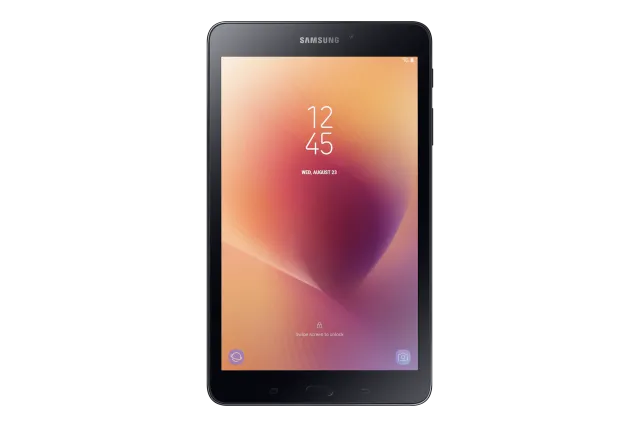
Black
Tablet · Samsung Galaxy Tab A 8.0 (2017)
Stock firmware and official updates for the Samsung Galaxy Tab A 8.0 (2017) (SM-T380), by region.
 Australia XSABuildT380DXS4CUD3AndroidAndroid 9Security patchDec 2020ReleasedMay 17, 2021DetailsWhat's new
 Austria ATOBuildT380DXS4CUD3AndroidAndroid 9Security patchDec 2020ReleasedMay 17, 2021DetailsWhat's new
Samsung's official release notes, newest first.
- The latest Android security patch has been applied. ㆍDevice security has been further enhanced.
Released for 1 CSC: TGY
Source: SamsungThe exact changes may differ depending on your device model, country/Region, and service provider. • Other bug fixes - Overall stability of functions improved. • The latest Android security patch has been applied. - Device security has been further enhanced.
Released for 1 CSC: TGY
Source: Samsung- The latest Android security patch has been applied. ㆍDevice security has been further enhanced.
Released for 1 CSC: TGY
Source: Samsung
 Dominican Republic DOOBuildT380DXS4CUF1AndroidAndroid 9Security patch—BuiltJun 14, 2021DetailsDownload
 France XEFBuildT380DXS4CUD3AndroidAndroid 9Security patchDec 2020ReleasedMay 17, 2021DetailsWhat's new
 Hong Kong SAR China TGYBuildT380DXS4CUD3AndroidAndroid 9Security patchDec 2020ReleasedMay 17, 2021DetailsWhat's new
 Italy ITVBuildT380DXS4CUD3AndroidAndroid 9Security patchDec 2020ReleasedMay 17, 2021DetailsWhat's new
 Netherlands PHNBuildT380DXS4CUD3AndroidAndroid 9Security patchDec 2020ReleasedMay 17, 2021DetailsWhat's new
 New Zealand XNZBuildT380DXS4CUD3AndroidAndroid 9Security patchDec 2020ReleasedMay 17, 2021DetailsWhat's new
 Poland XEOBuildT380DXS4CUD3AndroidAndroid 9Security patchDec 2020ReleasedMay 17, 2021DetailsWhat's new
 Portugal TPHBuildT380DXS4CUD3AndroidAndroid 9Security patchDec 2020ReleasedMay 17, 2021DetailsWhat's new
 Russia SERBuildT380DXS4CUD3AndroidAndroid 9Security patchDec 2020ReleasedMay 17, 2021DetailsWhat's new
 Singapore XSPBuildT380DXS4CUD3AndroidAndroid 9Security patchDec 2020ReleasedMay 17, 2021DetailsWhat's new
 Ukraine SEKBuildT380DXS4CUD3AndroidAndroid 9Security patchDec 2020ReleasedMay 17, 2021DetailsWhat's new
 United States XARBuildT380DXS4CUD3AndroidAndroid 9Security patchDec 2020ReleasedMay 17, 2021DetailsWhat's new
- The latest Android security patch has been applied. ㆍDevice security has been further enhanced.
Released for 1 CSC: TGY
Source: Samsung- The latest Android security patch has been applied. ㆍDevice security has been further enhanced.
Released for 1 CSC: TGY
Source: Samsung"Upgraded One UI for Android Pie One UI brings you Android Pie, with exciting new features and a whole new look and feel based on feedback from users in Samsung and Google. We recommend that you back up your important data to keep it safe before the upgrade. Some apps, including Calculator, Samsung Internet, Samsung Notes, and Samsung Members, need to be updated individually after you update your OS. To use the Remote unlock function in Find My Mobile on an Android Pie device, the screen lock password (or PIN/pattern) backup process is required. So please make sure that you remember the screen lock password (or PIN/pattern) before starting the update process. If you've forgotten the password (or PIN/pattern), reset it before starting the update process. Here’s what’s new. One UI - Content, settings, and other information have been reorganized to keep you focused on the task at hand. - Interactive elements have been moved to the bottom of the screen so they're always within reach. - New designs and features such as Night mode help keep your eyes comfortable. Notifications - In an app's notification settings, tap the switch once to turn on or off all the notifications in a category. Samsung Keyboard - New Unicode 11.0 emojis are available. - New adaptive theme changes your keyboard look based on the colors of the surrounding app. - Floating keyboard is available in all apps and has new size and transparency settings. - You can set a custom touch and hold delay. Device care (formerly Device maintenance) - Performance modes are streamlined and integrated into power saving modes. Settings - Menus have been reorganized to make settings easier to find. Bixby - Bixby is all new, with a range of improvements and new features. - Swipe left from the main Bixby screen to explore the latest features and supported apps. Contacts - The new drawer menu makes it easier to manage contacts from various accounts. Gallery - Photo Editor Pro's editing tools have been added to Gallery, so you can make all your edits and touchups without leaving the app. My Files - The new storage analysis tool has been added to help you monitor your storage usage and save space. - You can now show or hide items on the My Files Home screen. Other improvements and changes - HEIF images are now supported. - Galaxy Buds is supported - Gear IconX (2018) is supported - Access Kids Home on the quick panel."
Released for 1 CSC: TGY
Source: Samsung※ WARNING : The device will be restarted during the installation process ※
Released for 16 CSCs: ATO, AUT, DBT, ITV, LUX, PHN, SEK, SER, TPH, XAC, XAR, XEF, XEO, XNZ, XSA, XSP
Source: Samsung· Device stability improvements, bug fixes. · New and / or enhanced features. · Further improvements to performance.
Released for 7 CSCs: CHO, COO, DOO, MXO, PEO, TPA, UYO
Source: Samsung- The latest Android security patch has been applied. ㆍDevice security has been further enhanced.
Released for 1 CSC: TGY
Source: SamsungSamsung Experience 9.5 upgrade with Android Oreo Samsung Experience 9.5 brings you Android Oreo, with exciting new features from Samsung and Google based on feedback from users like you. We recommend that you back up your important data to keep it safe during the upgrade. Some apps, including Samsung Internet, Samsung Notes, and Email, should be updated individually before you can update your OS. Here’s what’s new. Quick Panel - Manage notifications for each app with notification categories (supported apps only). - Icons will be shown at the bottom of the notification panel for notifications that aren't currently visible. Home Screen - Touch and hold an app to display shortcuts to common or recommended tasks within the app (supported apps only). - Notification badges on app icons are linked with the notification panel. Clear a notification in one location, and it will also be cleared in the other location. Samsung Keyboard - The toolbar gives quick access to useful functions. - The GIF keyboard lets you send GIFs. - More high-contrast keyboards are available. System Performance - Background services are limited to improve performance and battery life. - Currently running apps will always be shown in the notification panel. Smart View - Let your phone's screen go dark when mirroring to another screen. Samsung account - Control your account settings and profile information for multiple apps. - Tap your profile picture on the main Settings page to access your profile information and account settings. Samsung Cloud - View and manage photos and notes stored only in Samsung Cloud. - Store any type of file in Samsung Cloud Drive. - Select specific items to delete or restore from your backups. - See how big each backup is and how many items it contains. Find My Mobile - Back up Secure Folder to Samsung Cloud remotely when your phone is lost. - Lock Samsung Pass using Find My Mobile. - The following functions have been added : Daily Board, Samsung Connect
Released for 1 CSC: TGY
Source: Samsung- The latest Android security patch has been applied. ㆍDevice security has been further enhanced.
Released for 1 CSC: TGY
Source: Samsung