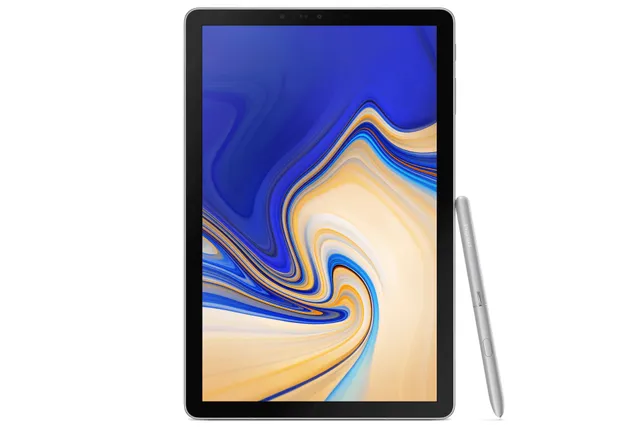
Gray
Tablet · Samsung Galaxy Tab S4
Stock firmware and official updates for the Samsung Galaxy Tab S4 (SM-T835), by region.
 Australia TELBuildT835DXU5CVG2AndroidAndroid 10Security patchJun 2022ReleasedAug 30, 2022DetailsWhat's newAustralia XSABuildT835DXU5CVG2AndroidAndroid 10Security patchJun 2022ReleasedAug 30, 2022DetailsWhat's new
Samsung's official release notes, newest first.
• Overall stability of your device has been improved. • The security of your device has been improved.
Released for 11 CSCs: ACR, AFR, ECT, EGY, ILO, KSA, MWD, XFA, XFE, XFV, XSG
Source: Samsung• Overall stability of functions improved. • The security of your device has been improved.
Released for 10 CSCs: BVO, CHO, COO, ECO, EON, GTO, PEO, PNT, TPA, ZTO
Source: Samsung• Overall stability of your device has been improved. • The security of your device has been improved.
Released for 1 CSC: SER
Source: Samsung Austria ATOAustria MAXBuildT835XXU5CVG2AndroidAndroid 10Security patchJun 2022ReleasedSep 15, 2022DetailsWhat's new
 Bangladesh BNGBuildT835DDS5CVE1AndroidAndroid 10Security patchMar 2022ReleasedMay 25, 2022DetailsWhat's new
 Bolivia BVOBuildT835UBU5CVG4AndroidAndroid 10Security patchJun 2022ReleasedDec 17, 2022DetailsWhat's new
 Brazil ZTOBuildT835UBU5CVG4AndroidAndroid 10Security patchJun 2022ReleasedDec 17, 2022DetailsWhat's new
 Bulgaria BGLBuildT835XXU5CVG2AndroidAndroid 10Security patchJun 2022ReleasedSep 15, 2022DetailsWhat's new
 Chile CHOBuildT835UBU5CVG4AndroidAndroid 10Security patchJun 2022ReleasedDec 17, 2022DetailsWhat's new
 Colombia COOBuildT835UBU5CVG4AndroidAndroid 10Security patchJun 2022ReleasedDec 17, 2022DetailsWhat's new
 Czechia TMZBuildT835XXU5CVG2AndroidAndroid 10Security patchJun 2022ReleasedSep 15, 2022DetailsWhat's newCzechia XEZBuildT835XXU5CVG2AndroidAndroid 10Security patchJun 2022ReleasedSep 15, 2022DetailsWhat's new
 Ecuador ECOBuildT835UBU5CVG4AndroidAndroid 10Security patchJun 2022ReleasedDec 17, 2022DetailsWhat's newEcuador EONBuildT835UBU5CVG4AndroidAndroid 10Security patchJun 2022ReleasedDec 17, 2022DetailsWhat's new
 Egypt EGYBuildT835JXU5CVI1AndroidAndroid 10Security patchJun 2022ReleasedDec 30, 2022DetailsWhat's new
 France XEFBuildT835XXU5CVG2AndroidAndroid 10Security patchJun 2022ReleasedSep 15, 2022DetailsWhat's new
 Georgia CAUBuildT835XXU5CVG2AndroidAndroid 10Security patchJun 2022ReleasedSep 15, 2022DetailsWhat's new
 Germany DBTBuildT835XXU5CVG2AndroidAndroid 10Security patchJun 2022ReleasedSep 15, 2022DetailsWhat's newGermany DTMBuildT835XXU5CVG2AndroidAndroid 10Security patchJun 2022ReleasedSep 15, 2022DetailsWhat's new
 Ghana ACRBuildT835JXU5CVI1AndroidAndroid 10Security patchJun 2022ReleasedDec 30, 2022DetailsWhat's new
 Greece EURBuildT835XXU5CVG2AndroidAndroid 10Security patchJun 2022ReleasedSep 15, 2022DetailsWhat's new
 Guatemala GTOBuildT835UBU5CVG4AndroidAndroid 10Security patchJun 2022ReleasedDec 17, 2022DetailsWhat's new
 Hungary TMHBuildT835XXU5CVG2AndroidAndroid 10Security patchJun 2022ReleasedSep 15, 2022DetailsWhat's newHungary XEHBuildT835XXU5CVG2AndroidAndroid 10Security patchJun 2022ReleasedSep 15, 2022DetailsWhat's new
 India INSBuildT835DDS5CVE1AndroidAndroid 10Security patchMar 2022ReleasedMay 25, 2022DetailsWhat's new
 Indonesia XIDBuildT835DXU5CVG2AndroidAndroid 10Security patchJun 2022ReleasedAug 30, 2022DetailsWhat's new
 Israel ILOBuildT835JXU5CVI1AndroidAndroid 10Security patchJun 2022ReleasedDec 30, 2022DetailsWhat's new
 Italy ITVBuildT835XXU5CVG2AndroidAndroid 10Security patchJun 2022ReleasedSep 15, 2022DetailsWhat's newItaly TIMBuildT835XXU5CVG2AndroidAndroid 10Security patchJun 2022ReleasedSep 15, 2022DetailsWhat's new
 Kazakhstan SKZBuildT835XXU5CVG2AndroidAndroid 10Security patchJun 2022ReleasedSep 15, 2022DetailsWhat's new
 Kyrgyzstan CACBuildT835XXU5CVG2AndroidAndroid 10Security patchJun 2022ReleasedSep 15, 2022DetailsWhat's new
 Latvia SEBBuildT835XXU5CVG2AndroidAndroid 10Security patchJun 2022ReleasedSep 15, 2022DetailsWhat's new
 Luxembourg LUXBuildT835XXU5CVG2AndroidAndroid 10Security patchJun 2022ReleasedSep 15, 2022DetailsWhat's new
 Malaysia XMEBuildT835DXU5CVG2AndroidAndroid 10Security patchJun 2022ReleasedAug 30, 2022DetailsWhat's new
 Morocco MWDBuildT835JXS5CWA1AndroidAndroid 10Security patchJun 2022ReleasedJan 10, 2023DetailsWhat's new
 Netherlands PHNBuildT835XXU5CVG2AndroidAndroid 10Security patchJun 2022ReleasedSep 15, 2022DetailsWhat's new
 New Zealand XNZBuildT835DXU5CVG2AndroidAndroid 10Security patchJun 2022ReleasedAug 30, 2022DetailsWhat's new
 Nigeria ECTBuildT835JXU5CVI1AndroidAndroid 10Security patchJun 2022ReleasedDec 30, 2022DetailsWhat's new
 Panama TPABuildT835UBU5CVG4AndroidAndroid 10Security patchJun 2022ReleasedDec 17, 2022DetailsWhat's new
 Peru PEOBuildT835UBU5CVG4AndroidAndroid 10Security patchJun 2022ReleasedDec 17, 2022DetailsWhat's newPeru PNTBuildT835UBU5CVG4AndroidAndroid 10Security patchJun 2022ReleasedDec 17, 2022DetailsWhat's new
 Philippines XTCBuildT835DXU5CVG2AndroidAndroid 10Security patchJun 2022ReleasedAug 30, 2022DetailsWhat's new
 Poland PLSBuildT835XXU5CVG2AndroidAndroid 10Security patchJun 2022ReleasedSep 15, 2022DetailsWhat's newPoland XEOBuildT835XXU5CVG2AndroidAndroid 10Security patchJun 2022ReleasedSep 15, 2022DetailsWhat's new
 Portugal TPHBuildT835XXU5CVG2AndroidAndroid 10Security patchJun 2022ReleasedSep 15, 2022DetailsWhat's new
 Romania ROMBuildT835XXU5CVG2AndroidAndroid 10Security patchJun 2022ReleasedSep 15, 2022DetailsWhat's new
 Russia SERBuildT835PUU5CVI1AndroidAndroid 10Security patchJun 2022ReleasedSep 27, 2022DetailsWhat's new
 Saudi Arabia KSABuildT835JXU5CVI1AndroidAndroid 10Security patchJun 2022ReleasedDec 30, 2022DetailsWhat's new
 Serbia SEEBuildT835XXU5CVG2AndroidAndroid 10Security patchJun 2022ReleasedSep 15, 2022DetailsWhat's new
 Singapore MM1BuildT835DXU5CVG2AndroidAndroid 10Security patchJun 2022ReleasedAug 30, 2022DetailsWhat's newSingapore SINBuildT835DXU5CVG2AndroidAndroid 10Security patchJun 2022ReleasedAug 30, 2022DetailsWhat's newSingapore STHBuildT835DXU5CVG2AndroidAndroid 10Security patchJun 2022ReleasedAug 30, 2022DetailsWhat's newSingapore XSPBuildT835DXU5CVG2AndroidAndroid 10Security patchJun 2022ReleasedAug 30, 2022DetailsWhat's new
 Slovakia XSKBuildT835XXU5CVG2AndroidAndroid 10Security patchJun 2022ReleasedSep 15, 2022DetailsWhat's new
 Slovenia SIMBuildT835XXU5CVG2AndroidAndroid 10Security patchJun 2022ReleasedSep 15, 2022DetailsWhat's new
 South Africa XFABuildT835JXU5CVI1AndroidAndroid 10Security patchJun 2022ReleasedDec 30, 2022DetailsWhat's newSouth Africa XFEBuildT835JXU5CVI1AndroidAndroid 10Security patchJun 2022ReleasedDec 30, 2022DetailsWhat's newSouth Africa XFVBuildT835JXU5CVI1AndroidAndroid 10Security patchJun 2022ReleasedDec 30, 2022DetailsWhat's new
 Spain PHEBuildT835XXU5CVG2AndroidAndroid 10Security patchJun 2022ReleasedSep 15, 2022DetailsWhat's new
 Sri Lanka SLKBuildT835DDS5CVE1AndroidAndroid 10Security patchMar 2022ReleasedMay 25, 2022DetailsWhat's new
 Sweden NEEBuildT835XXU5CVG2AndroidAndroid 10Security patchJun 2022ReleasedSep 15, 2022DetailsWhat's new
 Switzerland AUTBuildT835XXU5CVG2AndroidAndroid 10Security patchJun 2022ReleasedSep 15, 2022DetailsWhat's newSwitzerland SWCBuildT835XXU5CVG2AndroidAndroid 10Security patchJun 2022ReleasedSep 15, 2022DetailsWhat's new
 Taiwan BRIBuildT835DXU5CVG2AndroidAndroid 10Security patchJun 2022ReleasedAug 30, 2022DetailsWhat's new
 Thailand CAMBuildT835DXU5CVG2AndroidAndroid 10Security patchJun 2022ReleasedAug 30, 2022DetailsWhat's newThailand MYMBuildT835DXU5CVG2AndroidAndroid 10Security patchJun 2022ReleasedAug 30, 2022DetailsWhat's newThailand THLBuildT835DXU5CVG2AndroidAndroid 10Security patchJun 2022ReleasedAug 30, 2022DetailsWhat's new
 UK & IRE BTUBuildT835XXU5CVG2AndroidAndroid 10Security patchJun 2022ReleasedSep 15, 2022DetailsWhat's new
 Ukraine SEKBuildT835XXU5CVG2AndroidAndroid 10Security patchJun 2022ReleasedSep 15, 2022DetailsWhat's new
 United Arab Emirates AFRBuildT835JXU5CVI1AndroidAndroid 10Security patchJun 2022ReleasedDec 30, 2022DetailsWhat's newUnited Arab Emirates XSGBuildT835JXU5CVI1AndroidAndroid 10Security patchJun 2022ReleasedDec 30, 2022DetailsWhat's new
 Vietnam XXVBuildT835DXU5CVG2AndroidAndroid 10Security patchJun 2022ReleasedAug 30, 2022DetailsWhat's new
• Overall stability of your device has been improved. • The security of your device has been improved.
Released for 32 CSCs: ATO, AUT, BGL, BTU, CAC, CAU, DBT, DTM, EUR, ITV, LUX, MAX, NEE, PHE, PHN, PLS, ROM, SEB, SEE, SEK, SIM, SKZ, SWC, TIM, TMH, TMZ, TPH, XEF, XEH, XEO, XEZ, XSK
Source: Samsung• Overall stability of your device has been improved. • The security of your device has been improved.
Released for 15 CSCs: BRI, CAM, MM1, MYM, SIN, STH, TEL, THL, XID, XME, XNZ, XSA, XSP, XTC, XXV
Source: Samsung• The security of your device has been improved.
Released for 10 CSCs: ACR, AFR, ECT, EGY, ILO, KSA, XFA, XFE, XFV, XSG
Source: Samsung• The security of your device has been improved.
Released for 10 CSCs: ACR, AFR, ECT, EGY, ILO, KSA, XFA, XFE, XFV, XSG
Source: Samsung• Overall stability of functions improved. • The security of your device has been improved.
Released for 10 CSCs: BVO, CHO, COO, ECO, EON, GTO, PEO, PNT, TPA, ZTO
Source: Samsung• Overall stability of functions improved. • The security of your device has been improved.
Released for 1 CSC: ECO
Source: Samsung• Overall stability of functions improved. • The security of your device has been improved.
Released for 9 CSCs: BVO, CHO, COO, EON, GTO, PEO, PNT, TPA, ZTO
Source: Samsung• The security of your device has been improved. Other Changes - as part of the implementation of the requirements of the Decree of the Government of the Russian Federation No. 1867 of 18.11.2020, the download of mandatory applications has been added; - some of these apps will only be installed if the device is reset to factory settings; To learn more about the Decree of the Government of the Russian Federation No. 1867 of 18.11.2020, please follow the link http://publication.pravo.gov.ru/Document/View/0001202011230051 If you have any questions about downloading the required apps, please contact Samsung Electronics Customer Support via the feedback form on our website [https://www.samsung.com/ru/support/email/] or by phone 8-800-555-55-55 (free of charge from city and mobile phones of local mobile operators in Russia).
Released for 1 CSC: SER
Source: Samsung• The security of your device has been improved.
Released for 32 CSCs: ATO, AUT, BGL, BTU, CAC, CAU, DBT, DTM, EUR, ITV, LUX, MAX, NEE, PHE, PHN, PLS, ROM, SEB, SEE, SEK, SIM, SKZ, SWC, TIM, TMH, TMZ, TPH, XEF, XEH, XEO, XEZ, XSK
Source: Samsung• The security of your device has been improved.
Released for 15 CSCs: BRI, CAM, MM1, MYM, SIN, STH, TEL, THL, XID, XME, XNZ, XSA, XSP, XTC, XXV
Source: Samsung• Overall stability of your device has been improved. • The security of your device has been improved.
Released for 32 CSCs: ATO, AUT, BGL, BTU, CAC, CAU, DBT, DTM, EUR, ITV, LUX, MAX, NEE, PHE, PHN, PLS, ROM, SEB, SEE, SEK, SIM, SKZ, SWC, TIM, TMH, TMZ, TPH, XEF, XEH, XEO, XEZ, XSK
Source: Samsung• Overall stability of your device has been improved. • The security of your device has been improved.
Released for 15 CSCs: BRI, CAM, MM1, MYM, SIN, STH, TEL, THL, XID, XME, XNZ, XSA, XSP, XTC, XXV
Source: Samsung• Enhanced Quick Share - Improve file sharing between Galaxy devices using Quick Share. • Gallery app has been updated in order to improve performance and quality. • Overall stability of functions improved.
Released for 1 CSC: ECO
Source: Samsung• Enhanced Quick Share - Improve file sharing between Galaxy devices using Quick Share. • Gallery app has been updated in order to improve performance and quality. • Overall stability of functions improved.
Released for 9 CSCs: BVO, CHO, COO, EON, GTO, PEO, PNT, TPA, ZTO
Source: Samsung• Enhanced Quick Share - Improve file sharing between Galaxy devices using Quick Share. • Overall stability of functions improved.
Released for 15 CSCs: BRI, CAM, MM1, MYM, SIN, STH, TEL, THL, XID, XME, XNZ, XSA, XSP, XTC, XXV
Source: Samsung• The security of your device has been improved.
Released for 10 CSCs: ACR, AFR, ECT, EGY, ILO, KSA, XFA, XFE, XFV, XSG
Source: Samsung• Enhanced Quick Share - Improve file sharing between Galaxy devices using Quick Share. • Overall stability of functions improved.
Released for 32 CSCs: ATO, AUT, BGL, BTU, CAC, CAU, DBT, DTM, EUR, ITV, LUX, MAX, NEE, PHE, PHN, PLS, ROM, SEB, SEE, SEK, SIM, SKZ, SWC, TIM, TMH, TMZ, TPH, XEF, XEH, XEO, XEZ, XSK
Source: Samsung• Enhanced Quick Share - Improve file sharing between Galaxy devices using Quick Share. • Overall stability of functions improved. • The security of your device has been improved.
Released for 3 CSCs: BNG, INS, SLK
Source: Samsung• Improved battery charging algorithm and stability • The stability of Camera has been improved. • Overall stability of functions improved. • The security of your device has been improved.
Released for 1 CSC: SER
Source: Samsung• LGPD (General Personal Data Protection Law) has been applied. • The security of your device has been improved.
Released for 1 CSC: ZTO
Source: Samsung· The security of your device has been improved.
Released for 10 CSCs: ACR, AFR, ECT, EGY, ILO, KSA, MWD, XFA, XFE, XFV
Source: Samsung· The security of your device has been improved.
Released for 32 CSCs: ATO, AUT, BGL, BTU, CAC, CAU, DBT, DTM, EUR, ITV, LUX, MAX, NEE, PHE, PHN, PLS, ROM, SEB, SEE, SEK, SIM, SKZ, SWC, TIM, TMH, TMZ, TPH, XEF, XEH, XEO, XEZ, XSK
Source: Samsung· The security of your device has been improved.
Released for 15 CSCs: BRI, CAM, MM1, MYM, SIN, STH, TEL, THL, XID, XME, XNZ, XSA, XSP, XTC, XXV
Source: Samsung· Device stability improvements, bug fixes. · New and / or enhanced features. · Further improvements to performance.
Released for 3 CSCs: BNG, INS, SLK
Source: Samsung· Device stability improvements, bug fixes. · New and / or enhanced features. · Further improvements to performance.
Released for 10 CSCs: BVO, CHO, COO, ECO, EON, GTO, PEO, PNT, TPA, ZTO
Source: Samsung• The stability of Camera has been improved. • Overall stability of functions improved. • The stability of Secure Folder has been improved. • The security of your device has been improved.
Released for 32 CSCs: ATO, AUT, BGL, BTU, CAC, CAU, DBT, DTM, EUR, ITV, LUX, MAX, NEE, PHE, PHN, PLS, ROM, SEB, SEE, SEK, SIM, SKZ, SWC, TIM, TMH, TMZ, TPH, XEF, XEH, XEO, XEZ, XSK
Source: Samsung• The stability of Camera has been improved. • Overall stability of functions improved. • The stability of Secure Folder has been improved. • The security of your device has been improved.
Released for 1 CSC: SER
Source: Samsung• The stability of Camera has been improved. • Overall stability of functions improved. • The stability of Secure Folder has been improved. • The security of your device has been improved.
Released for 15 CSCs: BRI, CAM, MM1, MYM, SIN, STH, TEL, THL, XID, XME, XNZ, XSA, XSP, XTC, XXV
Source: Samsung• The security of your device has been improved.
Released for 10 CSCs: ACR, AFR, ECT, EGY, ILO, KSA, MWD, XFA, XFE, XFV
Source: Samsung• Improved battery charging algorithm and stability • The stability of Camera has been improved. • Overall stability of functions improved. • The security of your device has been improved.
Released for 32 CSCs: ATO, AUT, BGL, BTU, CAC, CAU, DBT, DTM, EUR, ITV, LUX, MAX, NEE, PHE, PHN, PLS, ROM, SEB, SEE, SEK, SIM, SKZ, SWC, TIM, TMH, TMZ, TPH, XEF, XEH, XEO, XEZ, XSK
Source: Samsung• Improved battery charging algorithm and stability • The stability of Camera has been improved. • Overall stability of functions improved. • The security of your device has been improved.
Released for 1 CSC: SER
Source: Samsung• The stability of Voice recognition has been improved. • Overall stability of functions improved. • The security of your device has been improved.
Released for 15 CSCs: BRI, CAM, MM1, MYM, SIN, STH, TEL, THL, XID, XME, XNZ, XSA, XSP, XTC, XXV
Source: Samsung• Improved battery charging algorithm and stability • The stability of Camera has been improved. • Overall stability of functions improved. • The security of your device has been improved.
Released for 9 CSCs: ACR, AFR, ECT, EGY, ILO, KSA, MWD, XFE, XSG
Source: Samsung• Improved battery charging algorithm and stability • The stability of Camera has been improved. • Overall stability of functions improved. • The security of your device has been improved.
Released for 15 CSCs: BRI, CAM, MM1, MYM, SIN, STH, TEL, THL, XID, XME, XNZ, XSA, XSP, XTC, XXV
Source: Samsung· Device stability improvements, bug fixes. · New and / or enhanced features. · Further improvements to performance.
Released for 10 CSCs: BVO, CHO, COO, ECO, EON, GTO, PEO, PNT, TPA, ZTO
Source: Samsung• Improved battery charging algorithm and stability • The stability of Camera has been improved. • Overall stability of functions improved. • The security of your device has been improved.
Released for 32 CSCs: ATO, AUT, BGL, BTU, CAC, CAU, DBT, DTM, EUR, ITV, LUX, MAX, NEE, PHE, PHN, PLS, ROM, SEB, SEE, SEK, SIM, SKZ, SWC, TIM, TMH, TMZ, TPH, XEF, XEH, XEO, XEZ, XSK
Source: Samsung• Improved battery charging algorithm and stability • The stability of Camera has been improved. • Overall stability of functions improved. • The security of your device has been improved.
Released for 1 CSC: SER
Source: Samsung• Improved battery charging algorithm and stability • The stability of Camera has been improved. • Overall stability of functions improved. • The security of your device has been improved.
Released for 3 CSCs: BNG, INS, SLK
Source: SamsungOne UI 2 upgrade with Android 10 One UI 2 brings you Android 10, with exciting new features from Samsung and Google based on feedback from users like you. We recommend that you back up your important data to keep it safe during the upgrade. Some apps, including Calculator, Samsung Internet, and Samsung Notes, need to be updated individually after you update your OS. Here's what's new. Dark mode - Enhanced image, text, and color adjustments for day and night environments. - Darkened wallpapers, widgets, and alarms while Dark mode is on. Icons and colors - Clearer app icons and system colors. - Improved layouts for titles and buttons to eliminate wasted screen space. Smoother animations - Enhanced animations with a playful touch. Full screen gestures - Added new navigation gestures. Refined interactions - Navigate more comfortably on large screens with minimal finger movement. - Easily focus on what matters with clearly highlighted buttons. Accessibility - High contrast keyboards and layouts for large text have been improved. - Listen to live speech and display it as text. Better text over wallpapers - See text more clearly against wallpaper, as One UI automatically adjusts font colors based on light and dark areas and color contrast in the image below. Media and devices - Replaced the SmartThings panel with the Media and Devices. - Media: Control music and videos playing on your tablet as well as other devices. - Devices: Check and control your SmartThings devices directly from the quick panel. Device care - The battery usage graph now provides more detailed information. Digital wellbeing - Set goals to keep your tablet usage in check. - Use Focus mode to help avoid distractions from your tablet. - Keep an eye on your kids with new parental controls. Camera - Added the ability to edit the modes that appear at the bottom of the screen. - Provided a More tab so you can quickly access hidden modes from the preview screen. - Improved the layout so you can focus on taking pictures without the settings getting in the way. Internet - Customize the quick menu to get instant access to the features you use the most. - Get more information from the app bar. - Install add-ons from the Galaxy Store to get even more features. Samsung Contacts - Added Trash feature for Contacts. Contacts that you delete will stay in the trash for 15 days before being deleted forever. Calendar - Stickers can be added to a date without creating an event. - Ringtones can be used for event alerts. Reminder - More options are available for repeating reminders. - Set location-based reminders for a specific period of time. - Share reminders with your family group and other sharing groups. - Set reminders for a specific date without an alert. My Files - Created a Trash feature so you can restore files if you delete something by mistake. - Added more filters you can use while searching to help you find things quickly. - You can now copy or move multiple files and folders to different destinations at the same time. Calculator - Added speed and time units to the unit converter. Samsung keyboard - A multilingual translation feature has been added. - A text undo/redo feature has been added. - You can now search for music in Spotify directly from the keyboard. - An icon to open Samsung Pass has been added. Quick Share - Files can now be quickly and easily shared with nearby Samsung devices using Quick Share. Music Share - Music Share now lets you share music with your friends using a Bluetooth audio device. Samsung Daily - Bixby Home has been replaced with Samsung Daily.
Released for 15 CSCs: BRI, CAM, MM1, MYM, SIN, STH, TEL, THL, XID, XME, XNZ, XSA, XSP, XTC, XXV
Source: SamsungOne UI 2 upgrade with Android 10 One UI 2 brings you Android 10, with exciting new features from Samsung and Google based on feedback from users like you. We recommend that you back up your important data to keep it safe during the upgrade. Some apps, including Calculator, Samsung Internet, and Samsung Notes, need to be updated individually after you update your OS. Here's what's new. Dark mode - Enhanced image, text, and color adjustments for day and night environments. - Darkened wallpapers, widgets, and alarms while Dark mode is on. Icons and colors - Clearer app icons and system colors. - Improved layouts for titles and buttons to eliminate wasted screen space. Smoother animations - Enhanced animations with a playful touch. Full screen gestures - Added new navigation gestures. Refined interactions - Navigate more comfortably on large screens with minimal finger movement. - Easily focus on what matters with clearly highlighted buttons. Accessibility - High contrast keyboards and layouts for large text have been improved. - Listen to live speech and display it as text. Better text over wallpapers - See text more clearly against wallpaper, as One UI automatically adjusts font colors based on light and dark areas and color contrast in the image below. Media and devices - Replaced the SmartThings panel with the Media and Devices. - Media: Control music and videos playing on your tablet as well as other devices. - Devices: Check and control your SmartThings devices directly from the quick panel. Device care - The battery usage graph now provides more detailed information. Digital wellbeing - Set goals to keep your tablet usage in check. - Use Focus mode to help avoid distractions from your tablet. - Keep an eye on your kids with new parental controls. Camera - Added the ability to edit the modes that appear at the bottom of the screen. - Provided a More tab so you can quickly access hidden modes from the preview screen. - Improved the layout so you can focus on taking pictures without the settings getting in the way. Internet - Customize the quick menu to get instant access to the features you use the most. - Get more information from the app bar. - Install add-ons from the Galaxy Store to get even more features. Samsung Contacts - Added Trash feature for Contacts. Contacts that you delete will stay in the trash for 15 days before being deleted forever. Calendar - Stickers can be added to a date without creating an event. - Ringtones can be used for event alerts. Reminder - More options are available for repeating reminders. - Set location-based reminders for a specific period of time. - Share reminders with your family group and other sharing groups. - Set reminders for a specific date without an alert. My Files - Created a Trash feature so you can restore files if you delete something by mistake. - Added more filters you can use while searching to help you find things quickly. - You can now copy or move multiple files and folders to different destinations at the same time. Calculator - Added speed and time units to the unit converter. Samsung keyboard - A multilingual translation feature has been added. - A text undo/redo feature has been added. - You can now search for music in Spotify directly from the keyboard. - An icon to open Samsung Pass has been added. Quick Share - Files can now be quickly and easily shared with nearby Samsung devices using Quick Share. Music Share - Music Share now lets you share music with your friends using a Bluetooth audio device. Samsung Daily - Bixby Home has been replaced with Samsung Daily.
Released for 11 CSCs: ACR, AFR, ECT, EGY, ILO, KSA, MWD, XFA, XFE, XFV, XSG
Source: SamsungOne UI 2 upgrade with Android 10 One UI 2 brings you Android 10, with exciting new features from Samsung and Google based on feedback from users like you. We recommend that you back up your important data to keep it safe during the upgrade. Some apps, including Calculator, Samsung Internet, and Samsung Notes, need to be updated individually after you update your OS. Here's what's new. Dark mode - Enhanced image, text, and color adjustments for day and night environments. - Darkened wallpapers, widgets, and alarms while Dark mode is on. Icons and colors - Clearer app icons and system colors. - Improved layouts for titles and buttons to eliminate wasted screen space. Smoother animations - Enhanced animations with a playful touch. Full screen gestures - Added new navigation gestures. Refined interactions - Navigate more comfortably on large screens with minimal finger movement. - Easily focus on what matters with clearly highlighted buttons. Accessibility - High contrast keyboards and layouts for large text have been improved. - Listen to live speech and display it as text. Better text over wallpapers - See text more clearly against wallpaper, as One UI automatically adjusts font colors based on light and dark areas and color contrast in the image below. Media and devices - Replaced the SmartThings panel with the Media and Devices. - Media: Control music and videos playing on your tablet as well as other devices. - Devices: Check and control your SmartThings devices directly from the quick panel. Device care - The battery usage graph now provides more detailed information. Digital wellbeing - Set goals to keep your tablet usage in check. - Use Focus mode to help avoid distractions from your tablet. - Keep an eye on your kids with new parental controls. Camera - Added the ability to edit the modes that appear at the bottom of the screen. - Provided a More tab so you can quickly access hidden modes from the preview screen. - Improved the layout so you can focus on taking pictures without the settings getting in the way. Internet - Customize the quick menu to get instant access to the features you use the most. - Get more information from the app bar. - Install add-ons from the Galaxy Store to get even more features. Samsung Contacts - Added Trash feature for Contacts. Contacts that you delete will stay in the trash for 15 days before being deleted forever. Calendar - Stickers can be added to a date without creating an event. - Ringtones can be used for event alerts. Reminder - More options are available for repeating reminders. - Set location-based reminders for a specific period of time. - Share reminders with your family group and other sharing groups. - Set reminders for a specific date without an alert. My Files - Created a Trash feature so you can restore files if you delete something by mistake. - Added more filters you can use while searching to help you find things quickly. - You can now copy or move multiple files and folders to different destinations at the same time. Calculator - Added speed and time units to the unit converter. Samsung keyboard - A multilingual translation feature has been added. - A text undo/redo feature has been added. - You can now search for music in Spotify directly from the keyboard. - An icon to open Samsung Pass has been added. Quick Share - Files can now be quickly and easily shared with nearby Samsung devices using Quick Share. Music Share - Music Share now lets you share music with your friends using a Bluetooth audio device. Samsung Daily - Bixby Home has been replaced with Samsung Daily.
Released for 10 CSCs: BVO, CHO, COO, ECO, EON, GTO, PEO, PNT, TPA, ZTO
Source: SamsungOne UI 2 upgrade with Android 10 One UI 2 brings you Android 10, with exciting new features from Samsung and Google based on feedback from users like you. We recommend that you back up your important data to keep it safe during the upgrade. Some apps, including Calculator, Samsung Internet, and Samsung Notes, need to be updated individually after you update your OS. Here's what's new. Dark mode - Enhanced image, text, and color adjustments for day and night environments. - Darkened wallpapers, widgets, and alarms while Dark mode is on. Icons and colors - Clearer app icons and system colors. - Improved layouts for titles and buttons to eliminate wasted screen space. Smoother animations - Enhanced animations with a playful touch. Full screen gestures - Added new navigation gestures. Refined interactions - Navigate more comfortably on large screens with minimal finger movement. - Easily focus on what matters with clearly highlighted buttons. Accessibility - High contrast keyboards and layouts for large text have been improved. - Listen to live speech and display it as text. Better text over wallpapers - See text more clearly against wallpaper, as One UI automatically adjusts font colors based on light and dark areas and color contrast in the image below. Media and devices - Replaced the SmartThings panel with the Media and Devices. - Media: Control music and videos playing on your tablet as well as other devices. - Devices: Check and control your SmartThings devices directly from the quick panel. Device care - The battery usage graph now provides more detailed information. Digital wellbeing - Set goals to keep your tablet usage in check. - Use Focus mode to help avoid distractions from your tablet. - Keep an eye on your kids with new parental controls. Camera - Added the ability to edit the modes that appear at the bottom of the screen. - Provided a More tab so you can quickly access hidden modes from the preview screen. - Improved the layout so you can focus on taking pictures without the settings getting in the way. Internet - Customize the quick menu to get instant access to the features you use the most. - Get more information from the app bar. - Install add-ons from the Galaxy Store to get even more features. Samsung Contacts - Added Trash feature for Contacts. Contacts that you delete will stay in the trash for 15 days before being deleted forever. Calendar - Stickers can be added to a date without creating an event. - Ringtones can be used for event alerts. Reminder - More options are available for repeating reminders. - Set location-based reminders for a specific period of time. - Share reminders with your family group and other sharing groups. - Set reminders for a specific date without an alert. My Files - Created a Trash feature so you can restore files if you delete something by mistake. - Added more filters you can use while searching to help you find things quickly. - You can now copy or move multiple files and folders to different destinations at the same time. Calculator - Added speed and time units to the unit converter. Samsung keyboard - A multilingual translation feature has been added. - A text undo/redo feature has been added. - You can now search for music in Spotify directly from the keyboard. - An icon to open Samsung Pass has been added. Quick Share - Files can now be quickly and easily shared with nearby Samsung devices using Quick Share. Music Share - Music Share now lets you share music with your friends using a Bluetooth audio device. Samsung Daily - Bixby Home has been replaced with Samsung Daily.
Released for 3 CSCs: BNG, INS, SLK
Source: SamsungOne UI 2 upgrade with Android 10 One UI 2 brings you Android 10, with exciting new features from Samsung and Google based on feedback from users like you. We recommend that you back up your important data to keep it safe during the upgrade. Some apps, including Calculator, Samsung Internet, and Samsung Notes, need to be updated individually after you update your OS. Here's what's new. Dark mode - Enhanced image, text, and color adjustments for day and night environments. - Darkened wallpapers, widgets, and alarms while Dark mode is on. Icons and colors - Clearer app icons and system colors. - Improved layouts for titles and buttons to eliminate wasted screen space. Smoother animations - Enhanced animations with a playful touch. Full screen gestures - Added new navigation gestures. Refined interactions - Navigate more comfortably on large screens with minimal finger movement. - Easily focus on what matters with clearly highlighted buttons. Accessibility - High contrast keyboards and layouts for large text have been improved. - Listen to live speech and display it as text. Better text over wallpapers - See text more clearly against wallpaper, as One UI automatically adjusts font colors based on light and dark areas and color contrast in the image below. Media and devices - Replaced the SmartThings panel with the Media and Devices. - Media: Control music and videos playing on your tablet as well as other devices. - Devices: Check and control your SmartThings devices directly from the quick panel. Device care - The battery usage graph now provides more detailed information. Digital wellbeing - Set goals to keep your tablet usage in check. - Use Focus mode to help avoid distractions from your tablet. - Keep an eye on your kids with new parental controls. Camera - Added the ability to edit the modes that appear at the bottom of the screen. - Provided a More tab so you can quickly access hidden modes from the preview screen. - Improved the layout so you can focus on taking pictures without the settings getting in the way. Internet - Customize the quick menu to get instant access to the features you use the most. - Get more information from the app bar. - Install add-ons from the Galaxy Store to get even more features. Samsung Contacts - Added Trash feature for Contacts. Contacts that you delete will stay in the trash for 15 days before being deleted forever. Calendar - Stickers can be added to a date without creating an event. - Ringtones can be used for event alerts. Reminder - More options are available for repeating reminders. - Set location-based reminders for a specific period of time. - Share reminders with your family group and other sharing groups. - Set reminders for a specific date without an alert. My Files - Created a Trash feature so you can restore files if you delete something by mistake. - Added more filters you can use while searching to help you find things quickly. - You can now copy or move multiple files and folders to different destinations at the same time. Calculator - Added speed and time units to the unit converter. Samsung keyboard - A multilingual translation feature has been added. - A text undo/redo feature has been added. - You can now search for music in Spotify directly from the keyboard. - An icon to open Samsung Pass has been added. Quick Share - Files can now be quickly and easily shared with nearby Samsung devices using Quick Share. Music Share - Music Share now lets you share music with your friends using a Bluetooth audio device. Samsung Daily - Bixby Home has been replaced with Samsung Daily.
Released for 32 CSCs: ATO, AUT, BGL, BTU, CAC, CAU, DBT, DTM, EUR, ITV, LUX, MAX, NEE, PHE, PHN, PLS, ROM, SEB, SEE, SEK, SIM, SKZ, SWC, TIM, TMH, TMZ, TPH, XEF, XEH, XEO, XEZ, XSK
Source: SamsungOne UI 2 upgrade with Android 10 One UI 2 brings you Android 10, with exciting new features from Samsung and Google based on feedback from users like you. We recommend that you back up your important data to keep it safe during the upgrade. Some apps, including Calculator, Samsung Internet, and Samsung Notes, need to be updated individually after you update your OS. Here's what's new. Dark mode - Enhanced image, text, and color adjustments for day and night environments. - Darkened wallpapers, widgets, and alarms while Dark mode is on. Icons and colors - Clearer app icons and system colors. - Improved layouts for titles and buttons to eliminate wasted screen space. Smoother animations - Enhanced animations with a playful touch. Full screen gestures - Added new navigation gestures. Refined interactions - Navigate more comfortably on large screens with minimal finger movement. - Easily focus on what matters with clearly highlighted buttons. Accessibility - High contrast keyboards and layouts for large text have been improved. - Listen to live speech and display it as text. Better text over wallpapers - See text more clearly against wallpaper, as One UI automatically adjusts font colors based on light and dark areas and color contrast in the image below. Media and devices - Replaced the SmartThings panel with the Media and Devices. - Media: Control music and videos playing on your tablet as well as other devices. - Devices: Check and control your SmartThings devices directly from the quick panel. Device care - The battery usage graph now provides more detailed information. Digital wellbeing - Set goals to keep your tablet usage in check. - Use Focus mode to help avoid distractions from your tablet. - Keep an eye on your kids with new parental controls. Camera - Added the ability to edit the modes that appear at the bottom of the screen. - Provided a More tab so you can quickly access hidden modes from the preview screen. - Improved the layout so you can focus on taking pictures without the settings getting in the way. Internet - Customize the quick menu to get instant access to the features you use the most. - Get more information from the app bar. - Install add-ons from the Galaxy Store to get even more features. Samsung Contacts - Added Trash feature for Contacts. Contacts that you delete will stay in the trash for 15 days before being deleted forever. Calendar - Stickers can be added to a date without creating an event. - Ringtones can be used for event alerts. Reminder - More options are available for repeating reminders. - Set location-based reminders for a specific period of time. - Share reminders with your family group and other sharing groups. - Set reminders for a specific date without an alert. My Files - Created a Trash feature so you can restore files if you delete something by mistake. - Added more filters you can use while searching to help you find things quickly. - You can now copy or move multiple files and folders to different destinations at the same time. Calculator - Added speed and time units to the unit converter. Samsung keyboard - A multilingual translation feature has been added. - A text undo/redo feature has been added. - You can now search for music in Spotify directly from the keyboard. - An icon to open Samsung Pass has been added. Quick Share - Files can now be quickly and easily shared with nearby Samsung devices using Quick Share. Music Share - Music Share now lets you share music with your friends using a Bluetooth audio device. Samsung Daily - Bixby Home has been replaced with Samsung Daily.
Released for 1 CSC: SER
Source: Samsung· Device stability improvements, bug fixes. · New and / or enhanced features. · Further improvements to performance.
Released for 2 CSCs: ECO, PNT
Source: Samsung· Device stability improvements, bug fixes. · New and / or enhanced features. · Further improvements to performance.
Released for 8 CSCs: BVO, CHO, COO, EON, GTO, PEO, TPA, ZTO
Source: Samsung· The security of your device has been improved. ※ If your device is encrypted, it must be decrypted before upgrading.
Released for 10 CSCs: ACR, AFR, ECT, EGY, ILO, MWD, XFA, XFE, XFV, XSG
Source: Samsung· Device stability improvements, bug fixes. · New and / or enhanced features. · Further improvements to performance.
Released for 2 CSCs: ECO, PNT
Source: Samsung· Device stability improvements, bug fixes. · New and / or enhanced features. · Further improvements to performance.
Released for 15 CSCs: BRI, CAM, MM1, MYM, SIN, STH, TEL, THL, XID, XME, XNZ, XSA, XSP, XTC, XXV
Source: Samsung· Device stability improvements, bug fixes. · New and / or enhanced features. · Further improvements to performance.
Released for 32 CSCs: ATO, AUT, BGL, BTU, CAC, CAU, DBT, DTM, EUR, ITV, LUX, MAX, NEE, PHE, PHN, PLS, ROM, SEB, SEE, SEK, SIM, SKZ, SWC, TIM, TMH, TMZ, TPH, XEF, XEH, XEO, XEZ, XSK
Source: Samsung