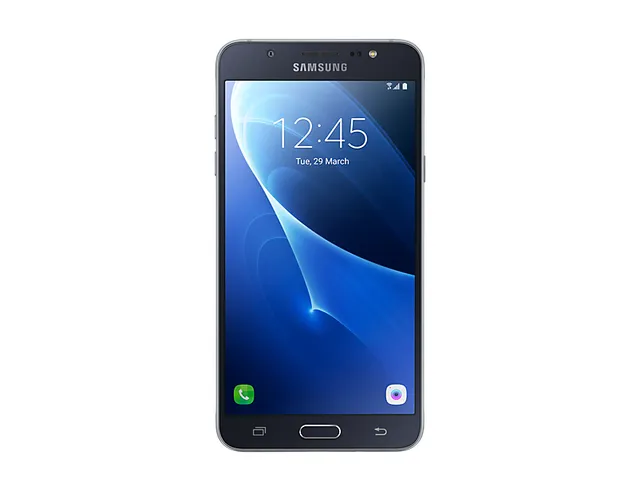
Phone · Samsung Galaxy J7 (2016)
Stock firmware and official updates for the Samsung Galaxy J7 (2016) (SM-J710MN), by region.
 Argentina AROBuildJ710MNUBS4CTF2AndroidAndroid 8Security patchMay 2020ReleasedAug 22, 2020DetailsWhat's new
Samsung's official release notes, newest first.
· Device stability improvements, bug fixes. · New and / or enhanced features. · Further improvements to performance.
Released for 3 CSCs: BAT, CHT, CHX
Source: Samsung· Device stability improvements, bug fixes. · New and / or enhanced features. · Further improvements to performance.
Released for 1 CSC: COO
Source: Samsung· Device stability improvements, bug fixes. · New and / or enhanced features. · Further improvements to performance.
Released for 1 CSC: ZVV
Source: Samsung· Device stability improvements, bug fixes. · New and / or enhanced features. · Further improvements to performance.
Released for 1 CSC: BVT
Source: SamsungTaken from the SM-J710F; this model can differ (chipset, network bands).
Argentina PSN Bolivia BVTBuildJ710MNUBS4CTF6AndroidAndroid 8Security patchMay 2020ReleasedJul 16, 2020DetailsWhat's newBolivia BVVBuildJ710MNUBS4CTF2AndroidAndroid 8Security patchMay 2020ReleasedAug 22, 2020DetailsWhat's new
 Brazil ZTOBuildJ710MNVJS4CTF2AndroidAndroid 8Security patchMay 2020ReleasedAug 18, 2020DetailsWhat's newBrazil ZTRBuildJ710MNVJS4CTF4AndroidAndroid 8Security patchMay 2020ReleasedAug 5, 2020DetailsWhat's newBrazil ZVVBuildJ710MNVJS4CTF4AndroidAndroid 8Security patchMay 2020ReleasedAug 5, 2020DetailsWhat's new
 Chile CHLBuildJ710MNUBS4CTF2AndroidAndroid 8Security patchMay 2020ReleasedAug 22, 2020DetailsWhat's newChile CHOBuildJ710MNUBS4CTF2AndroidAndroid 8Security patchMay 2020ReleasedAug 22, 2020DetailsWhat's newChile CHTBuildJ710MNUBS4CTF2AndroidAndroid 8Security patchMay 2020ReleasedAug 22, 2020DetailsWhat's newChile CHXBuildJ710MNUBS4CTF2AndroidAndroid 8Security patchMay 2020ReleasedAug 22, 2020DetailsWhat's new
 Colombia COOBuildJ710MNVJS4CTF2AndroidAndroid 8Security patchMay 2020ReleasedAug 18, 2020DetailsWhat's new
 Costa Rica ICEBuildJ710MNUBS4CTF2AndroidAndroid 8Security patchMay 2020ReleasedAug 22, 2020DetailsWhat's new
 Ecuador ALEBuildJ710MNUBS4CTF2AndroidAndroid 8Security patchMay 2020ReleasedAug 22, 2020DetailsWhat's newEcuador ECOBuildJ710MNUBS4CTF2AndroidAndroid 8Security patchMay 2020ReleasedAug 22, 2020DetailsWhat's newEcuador EONBuildJ710MNUBS4CTF2AndroidAndroid 8Security patchMay 2020ReleasedAug 22, 2020DetailsWhat's new
 Guatemala PGUBuildJ710MNUBS4CTF2AndroidAndroid 8Security patchMay 2020ReleasedAug 22, 2020DetailsWhat's newGuatemala TGUBuildJ710MNUBS4CTF2AndroidAndroid 8Security patchMay 2020ReleasedAug 22, 2020DetailsWhat's new
 Jamaica JDIBuildJ710MNUBS4CTF2AndroidAndroid 8Security patchMay 2020ReleasedAug 22, 2020DetailsWhat's new
 Mexico MAOBuildJ710MNVJS4CTF2AndroidAndroid 8Security patchMay 2020ReleasedAug 18, 2020DetailsWhat's newMexico MXOBuildJ710MNVJS4CSL2AndroidAndroid 8Security patchDec 2019ReleasedJan 17, 2020DetailsWhat's newMexico TCEBuildJ710MNVJS4CTF2AndroidAndroid 8Security patchMay 2020ReleasedAug 18, 2020DetailsWhat's newMexico TMMBuildJ710MNVJS4CTF2AndroidAndroid 8Security patchMay 2020ReleasedAug 18, 2020DetailsWhat's new
 Nicaragua NBSBuildJ710MNUBS4CTF2AndroidAndroid 8Security patchMay 2020ReleasedAug 22, 2020DetailsWhat's new
 Panama PCWBuildJ710MNUBS4CTF2AndroidAndroid 8Security patchMay 2020ReleasedAug 22, 2020DetailsWhat's newPanama TPABuildJ710MNUBS4CTF2AndroidAndroid 8Security patchMay 2020ReleasedAug 22, 2020DetailsWhat's new
 Paraguay PSPBuildJ710MNUBS4CTF2AndroidAndroid 8Security patchMay 2020ReleasedAug 22, 2020DetailsWhat's newParaguay TGPBuildJ710MNUBS4CTF2AndroidAndroid 8Security patchMay 2020ReleasedAug 22, 2020DetailsWhat's newParaguay UPOBuildJ710MNUBS4CTF2AndroidAndroid 8Security patchMay 2020ReleasedAug 22, 2020DetailsWhat's new
 Peru PNTBuildJ710MNUBS4CTF2AndroidAndroid 8Security patchMay 2020ReleasedAug 22, 2020DetailsWhat's new
 Trinidad & Tobago BATBuildJ710MNUBS4CTF2AndroidAndroid 8Security patchMay 2020ReleasedAug 22, 2020DetailsWhat's newTrinidad & Tobago TTTBuildJ710MNUBS4CTF2AndroidAndroid 8Security patchMay 2020ReleasedAug 22, 2020DetailsWhat's new
 Uruguay ANCBuildJ710MNUBS4CTF2AndroidAndroid 8Security patchMay 2020ReleasedAug 22, 2020DetailsWhat's newUruguay UYOBuildJ710MNUBS4CTF2AndroidAndroid 8Security patchMay 2020ReleasedAug 22, 2020DetailsWhat's new
· Device stability improvements, bug fixes. · New and / or enhanced features. · Further improvements to performance.
Released for 1 CSC: BVT
Source: Samsung· Device stability improvements, bug fixes. · New and / or enhanced features. · Further improvements to performance.
Released for 3 CSCs: BAT, CHT, CHX
Source: Samsung· Device stability improvements, bug fixes. · New and / or enhanced features. · Further improvements to performance.
Released for 1 CSC: COO
Source: Samsung· Device stability improvements, bug fixes. · New and / or enhanced features. · Further improvements to performance.
Released for 1 CSC: ZVV
Source: Samsung· Device stability improvements, bug fixes. · New and / or enhanced features. · Further improvements to performance.
Released for 1 CSC: ZVV
Source: Samsung· Device stability improvements, bug fixes. · New and / or enhanced features. · Further improvements to performance.
Released for 7 CSCs: BAT, CHT, CHX, EON, TGP, TTT, UPO
Source: Samsung· Device stability improvements, bug fixes. · New and / or enhanced features. · Further improvements to performance.
Released for 3 CSCs: COO, MAO, MXO
Source: Samsung· Device stability improvements, bug fixes. · New and / or enhanced features. · Further improvements to performance.
Released for 1 CSC: CHE
Source: Samsung· Device stability improvements, bug fixes. · New and / or enhanced features. · Further improvements to performance.
Released for 19 CSCs: ALE, ANC, ARO, BVO, BVV, CHL, CHO, EBE, ECO, ICE, JDI, PCT, PCW, PNT, PSP, TGU, TPA, UFU, UYO
Source: Samsung· Device stability improvements, bug fixes. · New and / or enhanced features. · Further improvements to performance.
Released for 3 CSCs: TCE, TMM, ZTR
Source: SamsungSamsung Experience 9.5 upgrade with Android Oreo Samsung Experience 9.5 brings you Android Oreo, with exciting new features from Samsung and Google based on feedback from users like you. We recommend that you back up your important data to keep it safe during the upgrade. Some apps, including Samsung Internet, Samsung Notes, and Email, should be updated individually before you can update your OS. Here’s what’s new. Quick Panel - Manage notifications for each app with notification categories (supported apps only). - Icons will be shown at the bottom of the notification panel for notifications that aren't currently visible. Home Screen - Touch and hold an app to display shortcuts to common or recommended tasks within the app (supported apps only). - Notification badges on app icons are linked with the notification panel. Clear a notification in one location, and it will also be cleared in the other location. Samsung Keyboard - The toolbar gives quick access to useful functions. - The GIF keyboard lets you send GIFs. - More high-contrast keyboards are available. System Performance - Background services are limited to improve performance and battery life. - Currently running apps will always be shown in the notification panel. Smart View - Let your phone's screen go dark when mirroring to another screen. Samsung account - Control your account settings and profile information for multiple apps. - Tap your profile picture on the main Settings page to access your profile information and account settings. Samsung Cloud - View and manage photos and notes stored only in Samsung Cloud. - Store any type of file in Samsung Cloud Drive. - Select specific items to delete or restore from your backups. - See how big each backup is and how many items it contains. Find My Mobile - Back up Secure Folder to Samsung Cloud remotely when your phone is lost. - Lock Samsung Pass using Find My Mobile.
Released for 4 CSCs: CTI, CTP, CTU, UFN
Source: SamsungSamsung Experience 9.5 upgrade with Android Oreo Samsung Experience 9.5 brings you Android Oreo, with exciting new features from Samsung and Google based on feedback from users like you. We recommend that you back up your important data to keep it safe during the upgrade. Some apps, including Samsung Internet, Samsung Notes, and Email, should be updated individually before you can update your OS. Here’s what’s new. Quick Panel - Manage notifications for each app with notification categories (supported apps only). - Icons will be shown at the bottom of the notification panel for notifications that aren't currently visible. Home Screen - Touch and hold an app to display shortcuts to common or recommended tasks within the app (supported apps only). - Notification badges on app icons are linked with the notification panel. Clear a notification in one location, and it will also be cleared in the other location. Samsung Keyboard - The toolbar gives quick access to useful functions. - The GIF keyboard lets you send GIFs. - More high-contrast keyboards are available. System Performance - Background services are limited to improve performance and battery life. - Currently running apps will always be shown in the notification panel. Smart View - Let your phone's screen go dark when mirroring to another screen. Samsung account - Control your account settings and profile information for multiple apps. - Tap your profile picture on the main Settings page to access your profile information and account settings. Samsung Cloud - View and manage photos and notes stored only in Samsung Cloud. - Store any type of file in Samsung Cloud Drive. - Select specific items to delete or restore from your backups. - See how big each backup is and how many items it contains. Find My Mobile - Back up Secure Folder to Samsung Cloud remotely when your phone is lost. - Lock Samsung Pass using Find My Mobile.
Released for 2 CSCs: NBS, PSN
Source: Samsung· OS upgrade - Android 7.0 Nougat · Provides new UX and various performance modes · Improved usability of the Notification feature and Quick settings button · Improved usability of the Multi window · Efficient space for installation of downloaded apps, improved speed of system upgrade and app installation ※ If you are using Gear IconX, please make sure to update to the latest version before upgrading to the Nougat OS. ※ Some apps that haven't been optimised for Android Nougat might not work properly after the upgrade. In this case, upgrade the app to the latest version via Galaxy Apps or Play Store. ※ The functionality of some features may differ after the upgrade. Some apps may not function normally. ※ Errors during the upgrade may cause data loss. Back up any important data before upgrading.
Released for 1 CSC: PGU
Source: Samsung